
Automating Odoo Workflows with AI: From Data Entry to Approvals (2026)
 Siddharth JambukiyaOdoo Techno-Functional Consultant




Your team did not buy Odoo to spend its days re-keying invoices and nudging managers for sign-off, yet that is where the hours quietly go. Our AI workflow automation work removes that middle, and the sections below show how, step by step.
What automating Odoo workflows with AI actually means
It means handing the repetitive middle of a workflow, the reading, typing, checking, and routing, to AI, so a record travels from trigger to decision with little or no manual touch. The trigger and the final judgment stay human; the drudgery in between does not.
Think of any workflow you run today: a bill arrives, someone types it in, someone checks it against the order, someone routes it for approval, someone signs off. Four manual steps sit between the bill landing and the payment being approved, and every one of them is slow and error-prone.
AI compresses that middle. It is worth saying up front, though, that not every step needs AI, and knowing which ones do is half the skill. Start by seeing the workflow as a chain.
The AI automation chain in Odoo: capture, validate, route, approve
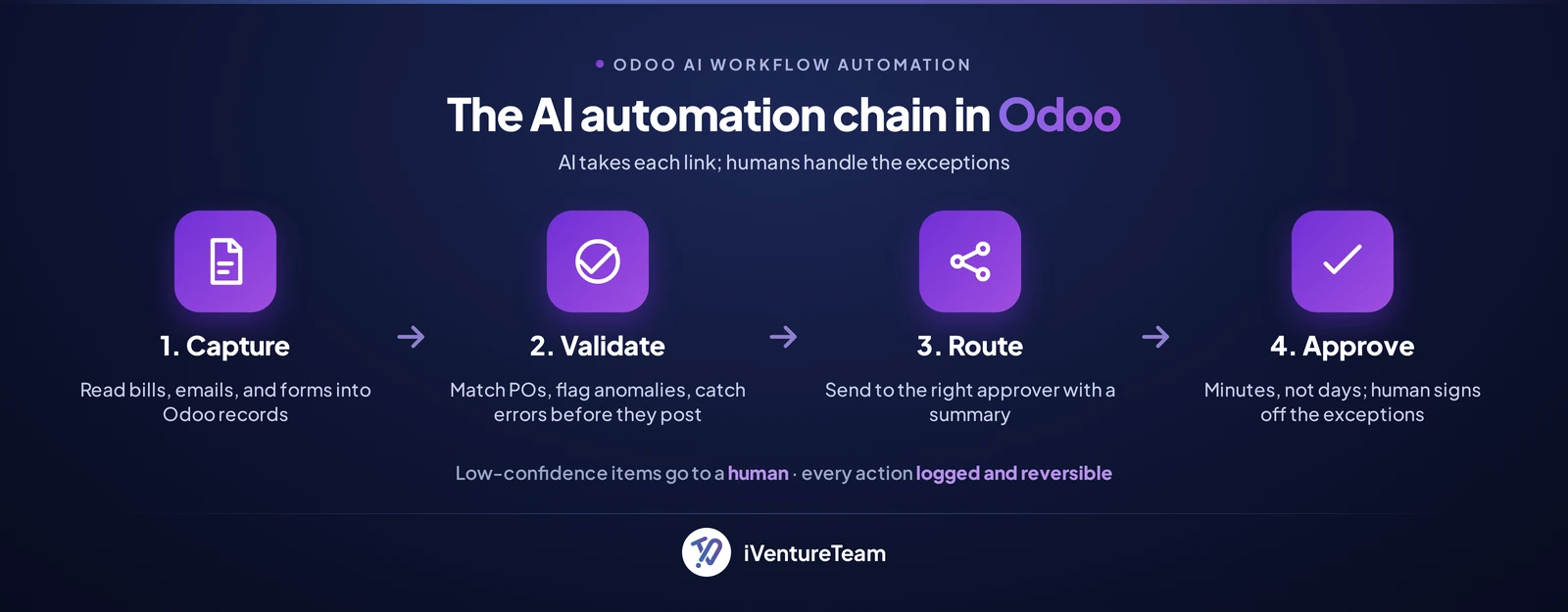
Almost every Odoo workflow follows the same chain: capture the data, validate it, route it to the right place, get it approved, and act; AI can take on each link, or all of them. Seeing the chain is what makes automation planned rather than random.
Capture pulls data in from a bill, email, or form. Validation checks it is right. Routing sends it to the correct person or record. Approval gets the decision, and then Odoo acts. The rest of this guide walks the links that eat the most time, starting with capture.
Automating data entry
AI turns invoices, emails, and forms into Odoo records automatically, so nobody re-types a supplier bill or copies a new enquiry into the CRM. This is the fastest win, because data entry is high-volume and low-judgment.
Bills and invoices: AI reads a PDF or scan, extracts the supplier, lines, and totals, and creates a vendor bill in Odoo, coded and ready to match.
Email to record: an enquiry that lands in the inbox becomes a CRM lead with the contact and context already filled in.
Forms and documents: application forms, contracts, and ID documents are extracted and pushed into the right record.
The payoff is immediate: hours of typing gone, and far fewer transposed numbers. Our AI document processing pipelines handle the extraction, validation, and audit trail. Getting data in is only useful if it is correct, which is the next link.
Automating checks and validation
AI checks each record before it posts, matching invoices to purchase orders, spotting duplicates, and flagging the anomalies a tired human misses. Catching an error here is far cheaper than fixing it after it posts.
A validation step can run a three-way match between the order, the receipt, and the invoice, flag a price that does not match the agreed rate, or catch a duplicate bill. The important part is what happens when it is unsure.
Well-built automation uses a confidence threshold: high-confidence records move on automatically, while anything the AI is unsure about is routed to a person to review. That single rule is what keeps speed from turning into risk, and it carries straight into approvals.
Automating approvals and routing
AI routes each item to the right approver, summarises what they need to decide, and drafts the outcome, so approvals take minutes instead of days, while the human still signs off on the exceptions. You get the speed without losing the sign-off.
Routing sends the item to the correct approver by amount, type, or policy, so nothing sits in the wrong inbox. The AI then summarises the request and its context, so the approver sees the decision in one glance rather than digging through records.
Crucially, every action is logged and reversible, and anything outside policy escalates to a human. You get a faster approval and a full audit trail, not a black box. Which raises a fair question: how much of this is AI, and how much is plain automation?
Rules, native AI, or a custom agent: pick the right layer
There are three layers to automate an Odoo workflow: free rule-based automation rules for predictable steps, Odoo 19's native AI for unstructured tasks, and a custom AI agent for anything spanning several systems. Matching the layer to the task is the whole game.
Automation rules, native and free: if-this-then-that logic, status changes, notifications, field updates, and scheduled actions. No AI, and no extra cost.
Odoo 19 native AI: Ask AI and configurable agents trained on your own documents, AI fields that generate content, and AI acting inside automation rules to read, draft, and classify.
Custom AI agent: an LLM and agent layer wired through Odoo's API for multi-step, cross-system workflows, which is where our AI in Odoo work comes in.
A partner that reaches for AI on every step is overselling; often a free automation rule does the job. For the wider catalogue of what Odoo AI can do, see our Odoo AI features and use cases guide. One question always follows: what happens to your data?
Is your data safe when AI runs your workflows?
It depends on the setup, and a good one keeps your data under control: only the fields a step needs are sent, sensitive values are redacted, and private or self-hosted models are used where the data is sensitive. Safe automation is a design choice, not an afterthought.
An AI step should see only what it needs, not your whole database, and personal or financial fields can be redacted before anything reaches a model. Where data is sensitive, a private or self-hosted model keeps it inside your own environment, and data-residency rules can be respected.
Done properly, the accounts, keys, and infrastructure stay in your name, so you own the automation rather than renting it. With that settled, the real question is where to point all this first.
Where it pays off, where to keep humans, and where to start
AI automation pays off on high-volume, rule-heavy, low-judgment work; keep humans on compliance, exceptions, and anything customer-facing that carries risk, and start with a single workflow before you scale. Focus beats breadth.
The best first targets are the high-volume chores: invoice entry, support-ticket triage, lead capture, and routine expense or leave approvals. Keep a human firmly on the final sign-off for payments, contracts, compliance, and the odd edge case that judgment alone can settle.
Start small: pick the highest-volume, lowest-risk workflow, automate it, and measure the hours saved before adding the next.
Teams commonly save 10 to 40 hours a week per workflow, and a single-workflow pilot typically costs about $1,200 to $4,000 to build, plus a small monthly cost for hosting and AI usage.
How iVentureTeam helps you automate Odoo with AI
iVentureTeam maps your highest-value workflows, wires the AI and integrations, and sets the guardrails, so automation is safe, measured, and owned by you. You get results, not a science project.
We audit your processes and rank them by hours saved against effort, design each workflow with human-in-the-loop checkpoints and a success metric, build on the right layer, and run it alongside the manual process until it is clearly better. Then we hand it over, in your accounts and your name.
That disciplined, guardrailed approach is exactly what the following project relied on.
Case study: an AI agent that triages 1,800 tickets a week
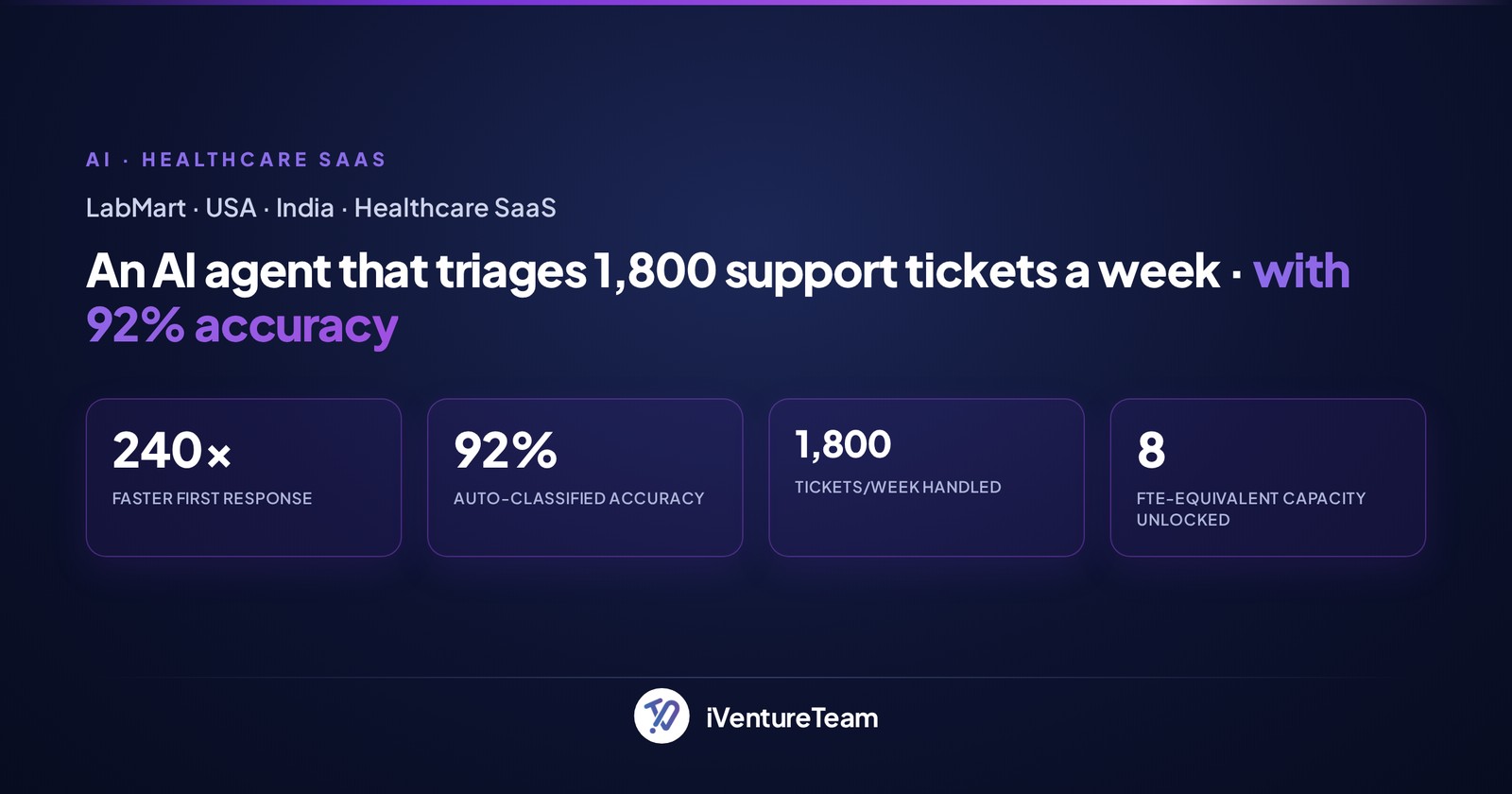
LabMart, a healthcare SaaS, replaced an eight-person support-triage queue with an AI agent wired into Odoo Helpdesk, handling 1,800 tickets a week at 92% accuracy and going live in 7 weeks. It is the automation chain done right, with guardrails.
A multi-LLM classifier reads each ticket, categorises and prioritises it, and routes it. A 78% confidence floor sends anything uncertain to a human, safety-critical tickets bypass automation entirely, and every decision is logged and reviewable.
The results make the point: first response dropped from 18 hours to 4.5 minutes, 92% of tickets are handled with no human touch, and the company saved around $340,000 a year while redeploying its team to customer success.
The bottom line on automating Odoo workflows with AI
Automating Odoo workflows with AI is about removing the manual middle, the capture, checking, routing, and approvals, while keeping humans on the exceptions and the high-stakes calls. The goal is leverage, not a hands-off black box.
Start with one high-volume workflow, use free automation rules where they fit and AI where they do not, and insist on confidence thresholds, human sign-off, and an audit trail. Do that, and Odoo runs the busywork while your team runs the business.
Ready to put your Odoo workflows on autopilot?
You do not have to guess which workflows to automate first. In a free 30-minute AI automation audit, a senior Odoo consultant ranks your highest-value Odoo workflows and maps a safe, measured path to automate them.
Get your free AI automation audit, call +91-93270-18076, or email business@iventureteam.com.
Frequently Asked Questions about Odoo AI Workflow Automation
Which Odoo workflows can AI automate?
+
The best fits are high-volume, low-judgment workflows: invoice and bill entry, email-to-record capture, data validation, approval routing, support-ticket triage, and lead qualification. AI handles the reading, checking, and drafting, while people approve the exceptions.
What is the difference between Odoo automation rules and AI?
+
Odoo's automation rules are free, native, if-this-then-that logic for predictable steps like status changes and notifications. AI is for unstructured or judgment work, such as reading a PDF, classifying a ticket, or drafting a reply. Use rules first and AI where rules cannot reach.
Does Odoo 19 have built-in AI?
+
Yes. Odoo 19 includes Ask AI in the command palette, configurable AI agents you can train on your own documents, AI fields that generate content, and AI that can act inside automation rules. Deeper, cross-system automation is built as a custom agent on top.
Is my data safe when AI automates my workflows?
+
It depends on the setup. A safe design sends only the fields a step needs, redacts sensitive data before it reaches a model, and uses private or self-hosted models where required. Keys and infrastructure stay in your name, so you keep control of the data.
What does AI workflow automation cost?
+
A single-workflow pilot typically costs about $1,200 to $4,000 to build, plus a small monthly cost for hosting and AI usage. A set of five to ten workflows is a larger project priced by scope. Most pilots pay back within a few months on hours saved.
Will AI automation replace my staff?
+
No. It removes the repetitive middle of workflows and lets people move to higher-value work, as LabMart did by redeploying its triage team to customer success. Humans stay on exceptions, judgment calls, and anything high-stakes or customer-facing.
Ready to put this into action?
Talk to iVentureTeam about Odoo, AI automation, or custom development — get a free, no-obligation consultation.
Continue reading
![Odoo Support: Complete Guide for Every Business [2026]](https://erp.iventureteam.com/api/blog/image/cover/odoo-support?v=20260926063132)
Need Odoo Support? We're Here to Help for Every Business Type (2026)
Read article
Odoo Upgrade Cost: Complete Guide for All Types of Business Owners [2026]
Read article