
How AI Is Transforming Odoo ERP: Practical Use Cases for 2026
 Siddharth JambukiyaOdoo Techno-Functional Consultant




Every Odoo team is now asking the same question: what can AI actually do inside our ERP, and what is just hype? Odoo 19 moved AI from a side experiment to a core layer of the product.
This guide walks through the real features, practical use cases by department, the built-in versus external choice, and how to adopt AI without overspending. If you are planning an Odoo AI integration, start here.
What is Odoo AI?
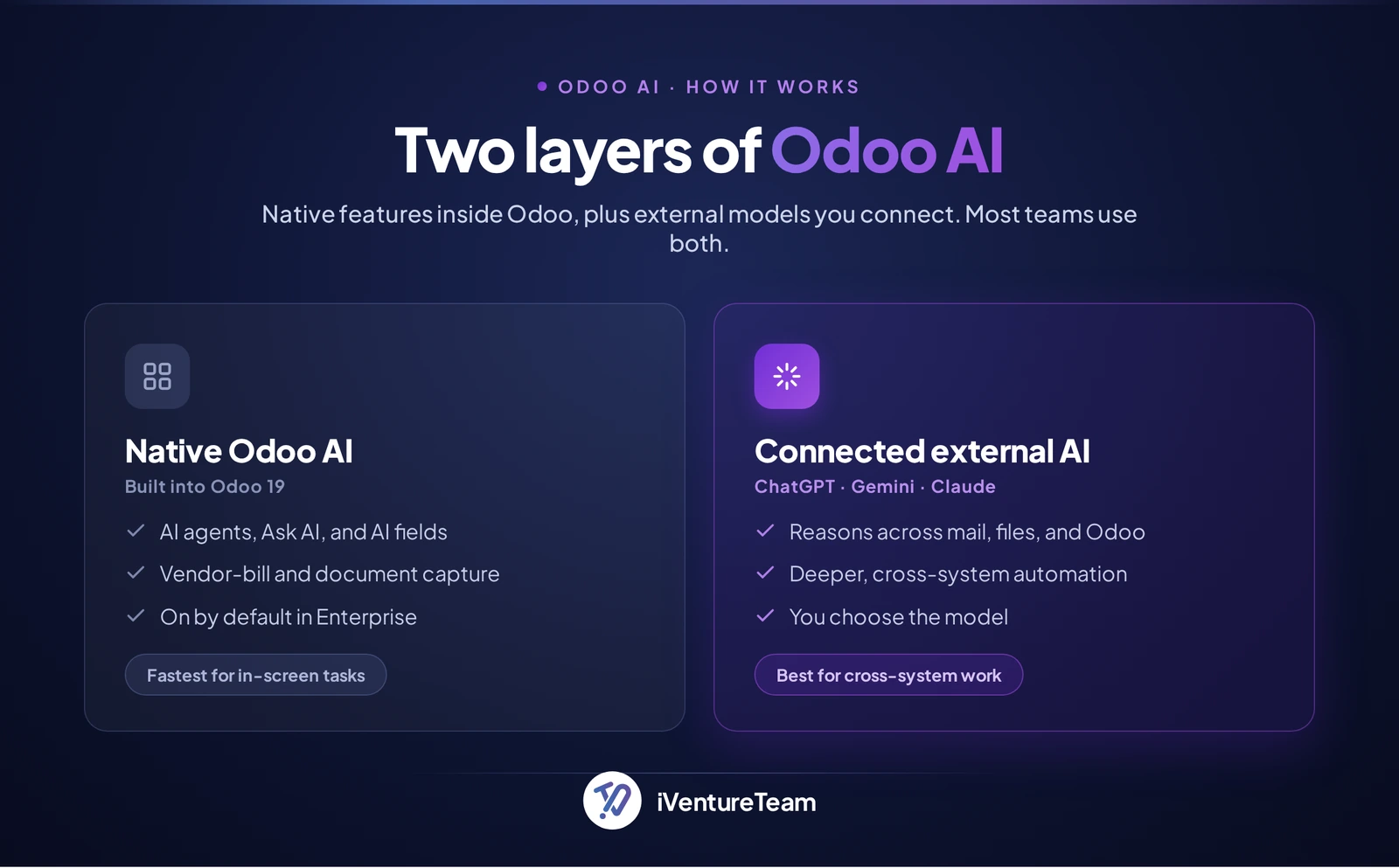
Odoo AI refers to the artificial intelligence capabilities native to Odoo 19, together with third-party models you connect to the platform. Native features live inside the apps you already use, and connected models extend Odoo to reason across your wider stack.
Think of it as two layers. The first is Odoo's own AI, shipped with the software and tuned for ERP tasks. The second is external AI, such as ChatGPT, Google Gemini, or Claude, wired in through APIs or automation so it can act on Odoo data alongside your other tools.
Most teams end up using both. The native layer removes small frictions inside a record, and the external layer handles work that spans email, files, and systems beyond the ERP.
Since the native layer is where most teams start, that is what we will look at first.
Odoo 19 AI features: what is built in
Odoo 19 introduced a dedicated AI app and embedded intelligence across the major modules. The headline additions are configurable AI agents, an Ask AI assistant, AI document capture, and AI-driven server actions, as Odoo's official AI documentation for version 19 sets out.
Odoo 18 offered lighter AI, mostly text generation and summaries. Odoo 19 is the release that makes AI a core layer, with agents that take actions, not just answer questions.
Here is what ships natively and where it shows up.
Feature | What it does | Where it shows up |
|---|---|---|
AI agents | Configurable assistants for chat, drafting, or filling fields | Any app, embedded in editable fields |
Ask AI | Answers questions and builds reports from plain language | Across the database |
Document digitization | Reads vendor bills and expenses into records | Accounting, Expenses |
Meeting transcription | Records, transcribes, and summarizes meetings | Documents, Discuss |
AI server actions | Runs automations from an AI prompt | Studio, automation rules |
AI Fields in Studio | Auto-generates field content from a prompt | Odoo Studio |
Document training | Trains an agent on your PDFs, policies, and data | AI agents |
Content assist | Drafts emails, descriptions, and replies | CRM, Sales, Website, Helpdesk |
Odoo AI agents you can configure
Odoo 19 lets you build AI agents without writing a model from scratch. You define the role, the instructions, and where the agent can act, then drop it into a chatbot, a text field, or a workflow. This is the base for department-specific assistants.
You can also train an agent on your own documents, so it answers from your policies and product data rather than generic knowledge. AI Fields in Studio then auto-generate content in a field from a prompt.
Ask AI across the database
Ask AI understands natural language, so a user can request a report and receive it with filters, groups, and views already applied. It can answer questions and open the right screen, which lowers the reporting skills a team needs to get answers.
AI document and invoice automation
The clearest quick win is AI-assisted vendor bill and expense capture. Odoo reads a supplier document and creates the record, which removes one of the most tedious data-entry jobs in any ERP and cuts entry errors.
In our Odoo 19 rollouts, this is usually the first feature that pays for itself, because accounts payable teams stop keying supplier data by hand.
AI assistant, dashboard, and chatbot
The same models power several front ends. Ask AI acts as an in-app assistant, an AI dashboard summarizes records on request, and you can publish an AI chatbot on your website or Helpdesk. One setup drives all three.
AI forecasting, inventory, and CRM
Odoo also applies AI to numbers, not just text. AI forecasting predicts demand and suggests reorder points across inventory, while AI in CRM scores leads and recommends the next action. Both turn history into decisions.
Practical Odoo AI use cases by department
The best way to judge Odoo AI is by the work it removes. Below are practical use cases mapped to the teams that feel the pain, from sales through finance to support.
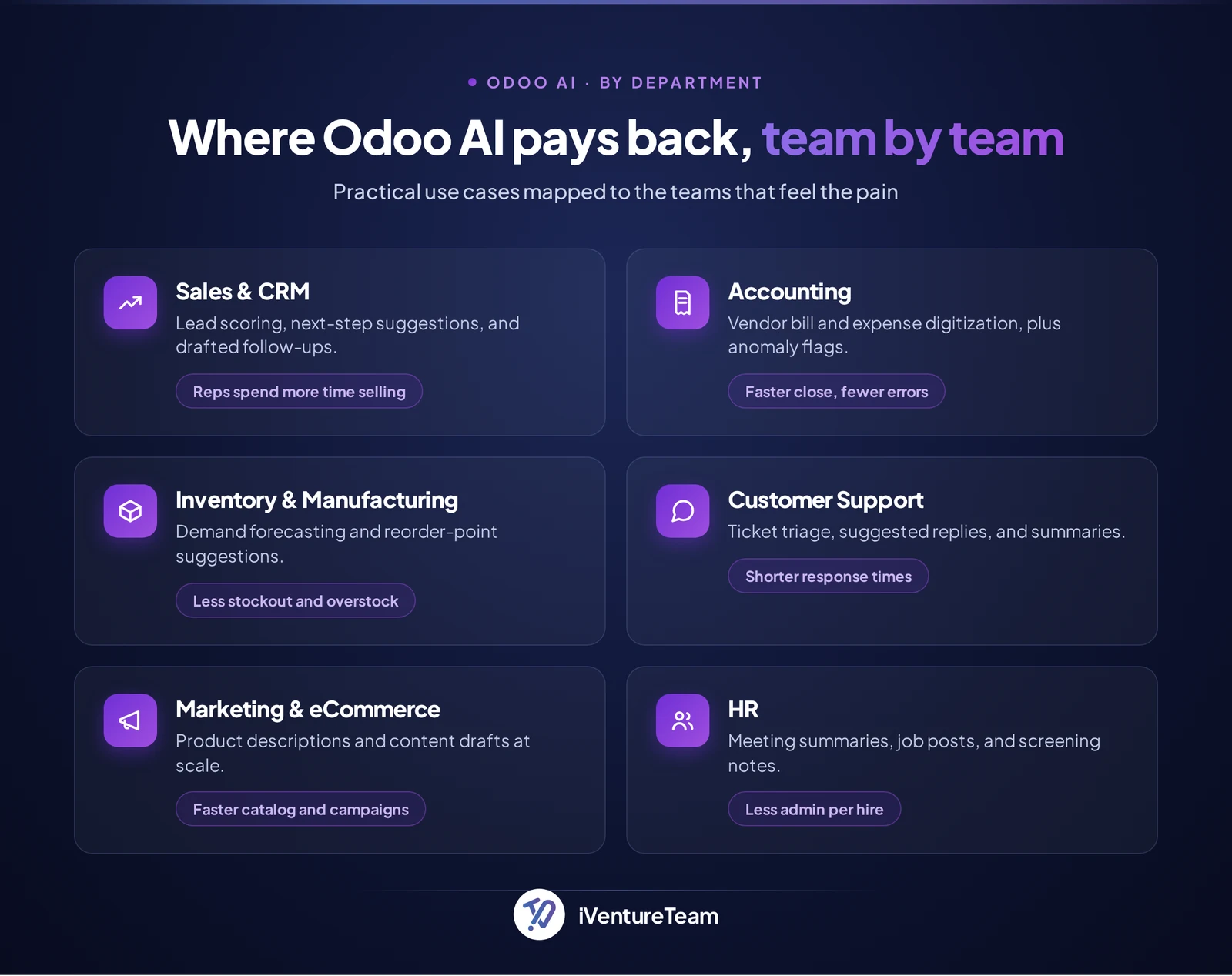
For an online store, AI-generated product copy pairs well with the platform choice itself. If you are still deciding where to sell, our breakdown of Odoo versus Shopify and WooCommerce covers that call in depth.
Many of these use cases work out of the box, but the highest-value ones are tailored. A scoring model tuned to your pipeline or an agent trained on your policies usually needs light Odoo customization to fit how your team actually works.
Which of these you run on Odoo's own AI, and which on a connected model, is the next decision to make.
Built-in Odoo AI vs external AI: which should you use?
Use Odoo's built-in AI for quick tasks inside a record, and a connected external model for work that reasons across systems. The two are complementary, and most organizations get the most value from running both.
Built-in AI is fastest when you are already in Odoo and want to draft an email, fill a field, or generate a description. External assistants like ChatGPT, Google Gemini, or Claude are stronger when the task spans mail, calendar, files, and Odoo together, or needs deeper reasoning.
Consideration | Built-in Odoo AI | Connected external AI |
|---|---|---|
Best for | Quick in-screen tasks | Cross-system reasoning and automation |
Setup | On by default in Enterprise | An integration project |
Data scope | Inside Odoo | Odoo plus your other tools |
Control | Vendor-managed | You choose the model |
There is a catch worth knowing. Odoo connects to providers like ChatGPT and Google Gemini through settings, so basic access is configuration, not code.
But wiring a model deeply into a specific workflow, or using a provider Odoo does not natively list, is an integration effort using APIs, server actions, or middleware.
That is where planned Odoo integration services keep the build stable and secure rather than a fragile script.
What does Odoo AI cost, and which edition do you need?
Odoo's built-in AI features are an Enterprise capability, available from the Standard plan upward, and the Community edition has no native AI. The feature access is included in the subscription, but the model usage is not unlimited.
Native AI runs on in-app purchase credits. The feature itself is included, yet each AI call consumes prepaid credits, so intensive use by a whole team becomes a real budget line, as Odoo's pricing page and in-app purchase terms explain.
Two costs stay separate. There is the licensing and usage above, and there is the setup effort to configure agents or integrate an external model, which sits alongside what Odoo implementation costs for the wider project. Budget for both.
Is Odoo AI worth it, and who is it for?
Odoo AI is worth it when you have repetitive, high-volume manual work and clean enough data to feed it. It pays back fastest for teams buried in data entry, support tickets, or routine drafting, and matters less when your volumes are low.
It fits best for growing SMBs and mid-market teams already on Odoo Enterprise, where a few hours saved per person each week is real money. Odoo admins get no-code wins, while owners get measurable time back.
Hold off, or start with external AI only, if you run Community edition, your records are messy, or no single task has the volume to measure. Fix the data and pick one use case first, then invest.
How to set up AI in Odoo 19: a step-by-step start
Setting up Odoo AI is quick. The real skill is proving value on one task before you scale, so the rollout pays back instead of burning credits. Here is the sequence we use.
Check your edition: Native AI needs Odoo Enterprise, from the Standard plan upward. Community has no built-in AI, so confirm your subscription first.
Enable the AI app: In Settings, turn on the AI features so agents, Ask AI, and AI fields become available across your modules.
Connect a provider: Choose your AI model and connect it, either through Odoo's in-app purchase service or by adding your own ChatGPT or Google Gemini API key.
Fund the usage: AI calls consume credits or your provider's quota, so top up in-app purchase credits or confirm API billing, and set a limit you can monitor.
Create your first agent: Set its role, its instructions, and the records it can access. Train it on your own documents when responses need your context.
Pilot one high-volume task: Point it at vendor-bill digitization or a weekly Ask AI report, then measure time saved and accuracy for two weeks.
Scale or integrate: Widen what works. For cross-system workflows, connect ChatGPT, Gemini, or Claude through a planned integration, not a quick script.
Review results before each expansion. A small, measured pilot beats a broad switch-on that no one trusts.
Most teams can handle steps one to five themselves. Bring in a partner when a use case needs custom agents, an external-model integration, or data cleanup first, since that is where rollouts usually stall.
Limitations of Odoo AI, and what to watch
Odoo AI is useful, not magic, and a few things deserve attention before you rely on it. Knowing the limits is what keeps adoption safe.
Credit costs can creep. The features are included, but every AI call spends IAP credits, so heavy team use becomes an ongoing line to monitor.
Outputs still need review. Models can produce a confident but wrong answer, so keep a human check on anything customer-facing or financial.
Data governance matters. Decide what each agent may read, especially when you connect external models, to protect sensitive records.
Quality depends on your data. Messy records give weak suggestions, while clean, well-structured Odoo data is what makes AI accurate.
Handled well, none of these are blockers. They are the reason a planned rollout beats flipping every switch at once.
How iVentureTeam helps with Odoo AI
We help businesses turn Odoo AI into practical, ROI-driven workflows by identifying high-impact use cases and configuring AI features around your business processes. Our AI Odoo Integration Services connect Odoo with ChatGPT, Gemini, Claude, and other leading AI models to build custom AI agents, intelligent automations, and secure AI-powered workflows.
We also ensure reliable data, proper governance, and user adoption, so your AI investment delivers long-term business value.
Odoo AI case study: triaging 1,800 support tickets a week
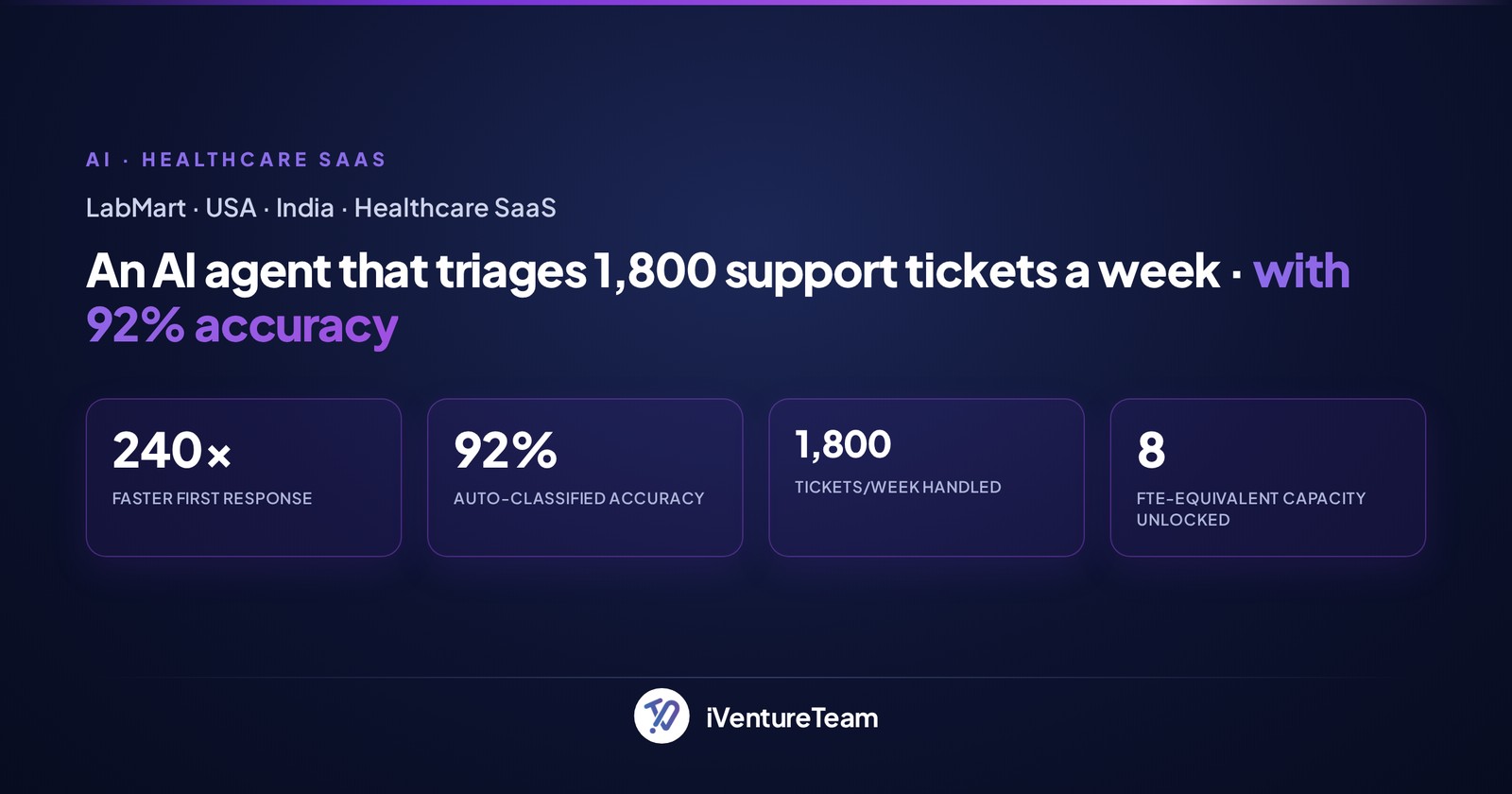
For a lab supplies retailer, we built an AI agent that triages 1,800 support tickets a week, routing and drafting responses so the team clears the queue faster.
It shows the pattern we favor: a narrow, high-volume task where AI removes hours of manual work. See how the LabMart AI automation came together.
Conclusion
AI in Odoo 19 is no longer a preview. Native agents, Ask AI, and document capture remove real manual work today, and connected models extend that reach across your whole stack.
The winners will not be the teams that switch everything on at once, but the ones that pick a few high-volume tasks, measure the payback, and scale what works.
Treat Odoo AI as a workflow decision, not a feature checkbox, and it becomes a genuine advantage.
Ready to put Odoo AI to work?
You do not need a big AI program to start. In one free consultation, we map your best first Odoo AI use case, the edition and credits it needs, and whether native features or a custom integration fit better.
You walk away with a clear, cost plan for a workflow that pays back in weeks, not a slide deck. Book a free Odoo AI consultation with our team.
Frequently Asked Questions
What is Odoo AI?
+
Odoo AI is the artificial intelligence built into Odoo 19, plus external models you connect to it. It automates data entry, drafts content, answers questions in plain language, and runs actions across your ERP.
Is AI available in Odoo Community?
+
No. The native AI features are an Enterprise capability, available from the Standard plan upward. Community edition users can still connect an external model through a custom integration, but there is no built-in AI.
How much does Odoo AI cost?
+
Access to the native features is included in the Enterprise subscription. The AI usage runs on prepaid in-app purchase credits, so cost scales with how heavily your team uses it. Setup or integration work is a separate investment.
Which AI providers does Odoo 19 support?
+
Odoo 19 natively connects to ChatGPT and Google Gemini through settings, using your own API key or in-app purchase credits. Claude and other models can be added through a custom integration for server actions and cross-system workflows.
What are the best Odoo AI use cases to start with?
+
Begin with high-volume manual work: vendor bill digitization in Accounting, a weekly Ask AI report, and support ticket triage. These deliver fast, measurable time savings before you invest in custom agents.
What is new in Odoo 19 AI compared to Odoo 18?
+
Odoo 18 offered lighter AI, mainly text generation and summaries. Odoo 19 adds a dedicated AI app, configurable agents that take actions, natural language search, AI Fields in Studio, and document training, making AI core to daily work.
Do Odoo AI features require coding?
+
Basic features and agents can be configured without code. Tailoring a scoring model, training an agent on your policies, or integrating an external model usually needs developer work to fit your exact process.
Ready to put this into action?
Talk to iVentureTeam about Odoo, AI automation, or custom development — get a free, no-obligation consultation.
Continue reading

Odoo 20 Field Service Change: Impact on Dispatch and Service Operations

Odoo 20 Light User: A Useful Guide for Every Business Owner (2026)
