
Odoo CRM: A Practical Guide for Sales Teams (Features, Setup, and Tips)
 Siddharth JambukiyaOdoo Techno-Functional Consultant




Most Odoo CRM guides are brochures. This one is written for the sales manager who has to make the pipeline actually work, so it is honest about what the Odoo CRM does well and where it needs help.
What is Odoo CRM?
Odoo CRM is the customer relationship management application within Odoo, used to capture leads, manage a sales pipeline, and turn opportunities into quotations, all from one shared database. It is one app in a suite, not a standalone product.
A common question is whether Odoo is a CRM or an ERP. The answer is both: Odoo is a full business suite, and CRM is the sales app inside it. That is its biggest advantage, because your pipeline, quotes, invoices, and inventory all share the same data.
For a sales team, that means a won opportunity flows straight into a quotation and then an order, with no re-keying and no disconnected tools. The CRM module is where that journey starts.
Key Odoo CRM features for sales teams
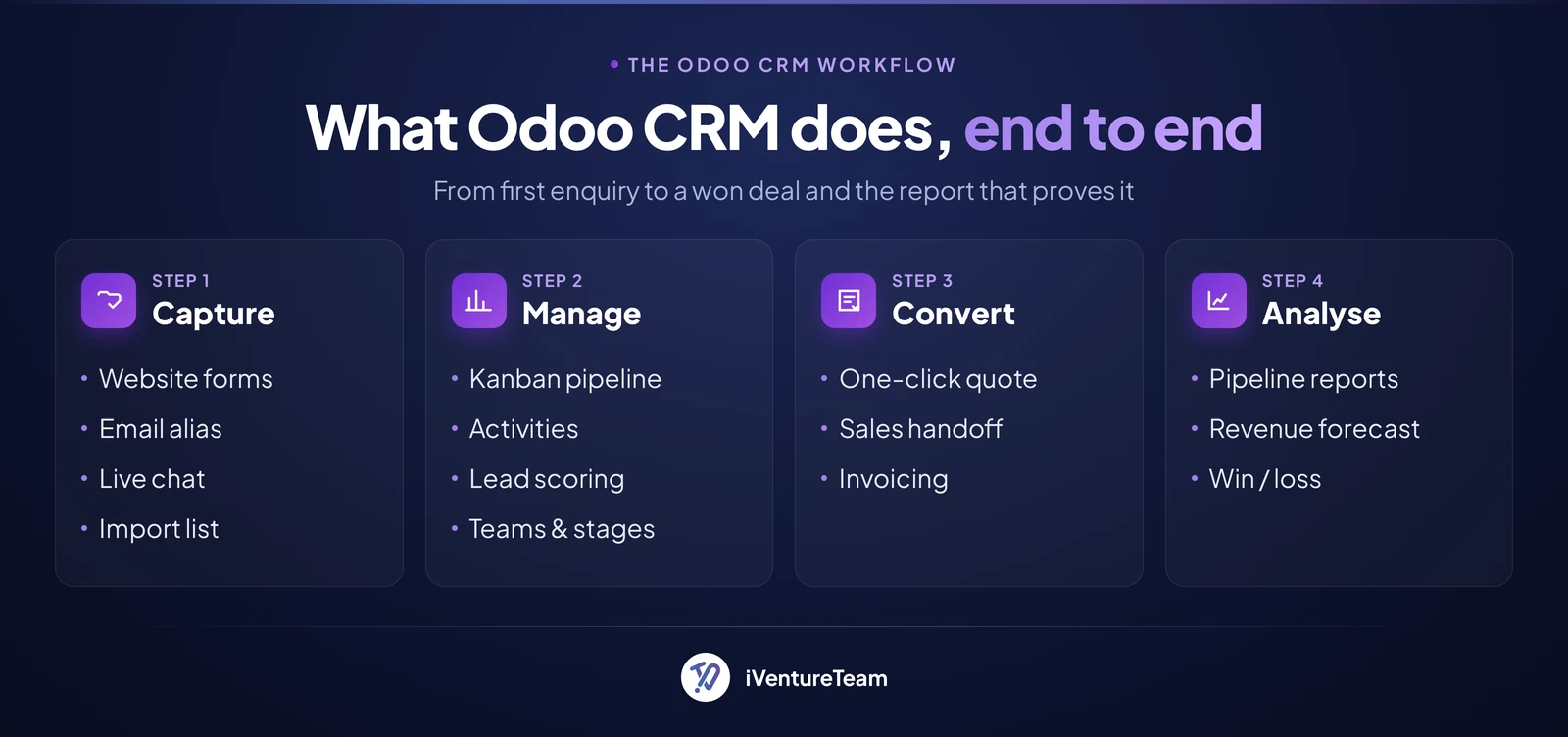
The core Odoo CRM features are a visual kanban pipeline, lead and opportunity management, scheduled activities, two-way email, predictive lead scoring, and live sales reporting. Together they cover the daily work of a sales team.
The pipeline is a drag-and-drop kanban board where each opportunity is a card that moves through stages you define, from new to won. Salespeople see their whole pipeline at a glance and update it in seconds.
Lead and opportunity management captures prospects from web forms, email, or import, then tracks every call, note, and document against the record. Nothing about a deal lives in someone's inbox or memory.
Scheduled activities keep deals moving: each opportunity carries next steps such as a call or follow-up, with reminders, so the pipeline runs on actions, not guesswork. Built-in email lets salespeople send and receive from inside the record.
Predictive lead scoring is standard in Odoo CRM. It uses a machine-learning model on your own historical data to score each opportunity by probability of winning, and it updates as the deal progresses, so teams focus on the leads most likely to close.
Reporting and forecasting round it out, with dashboards for expected revenue, win and loss analysis, and activity, so a manager can see the numbers without building a spreadsheet.
How to set up Odoo CRM, step by step
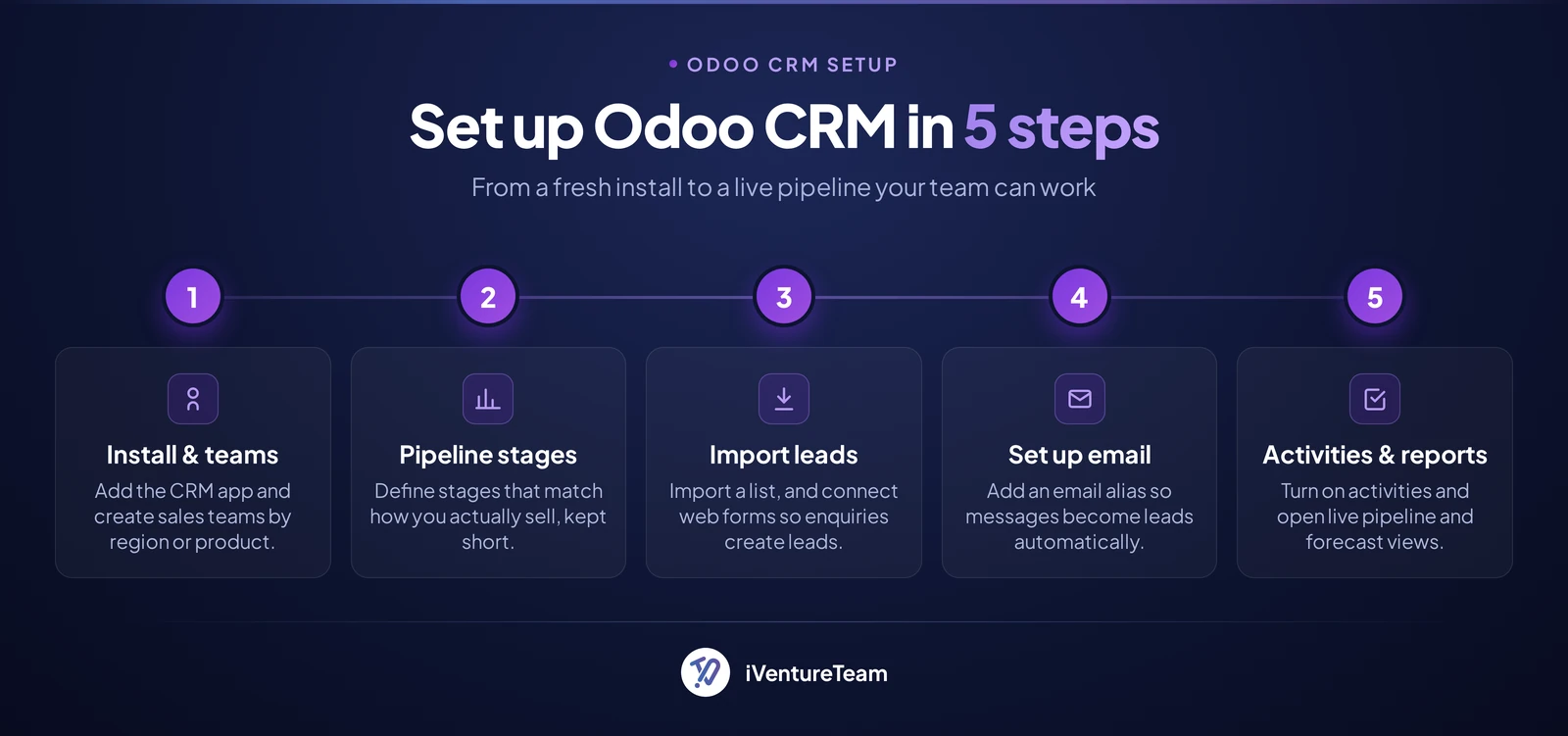
Setting up Odoo CRM means installing the app, creating your sales teams and pipeline stages, bringing in leads, configuring email, and switching on activities and reports. A basic setup takes a day; a tailored one takes longer.
First, install the CRM app, then create your sales teams from the Configuration menu, for example by region or product. Assign salespeople to each team so the pipeline and reports split cleanly.
Second, define your pipeline stages to match how you actually sell, such as new, qualified, proposal, and won. Keep the number of stages small so the board stays readable.
Third, bring in your leads. Import an existing list from a spreadsheet, connect your website contact and lead forms so new enquiries create opportunities automatically, and set up an email alias so messages become leads.
Fourth, turn on activities and, if useful, rule-based assignment, found under Configuration then Settings, which routes new leads to the right team or salesperson using rules you set, including the lead score. Finally, open the reporting views for live pipeline and forecast dashboards.
Practical tips and best practices for sales teams
The teams that get the most from Odoo CRM keep their stages clean, log every next step as an activity, use lead scoring to prioritise, and automate the repetitive parts. The tool rewards discipline more than configuration.
Keep the pipeline honest. Fewer, clearly defined stages beat a long list nobody agrees on, and an opportunity with no scheduled activity is a deal quietly going cold. Make "always have a next activity" a team rule.
Let the lead score guide the day. Work the high-probability opportunities first, and use rule-based assignment so no lead sits unclaimed. Use the reporting dashboards in one-to-ones instead of asking for manual updates.
Two common mistakes to avoid: over-customising before the team has used the standard flow, and treating Odoo CRM as a database rather than a daily tool. Adoption comes from a simple workflow salespeople actually follow.
How Odoo CRM connects to your other tools
Because Odoo CRM shares one database with the rest of Odoo, it connects natively to Sales, Invoicing, Email Marketing, and the website, and it can integrate with telephony, WhatsApp, and outside systems through the Odoo integration layer. That connectivity is the point of an all-in-one suite.
Inside Odoo, a won opportunity becomes a quotation in the Sales app in one click, and that quote flows into invoicing, so marketing, sales, and finance work from the same record. Website lead forms and live chat feed the pipeline directly.
Beyond the suite, Odoo CRM can wire into telephony and messaging channels and connect to third-party systems through its integration layer. If you are moving from another CRM such as Salesforce or Zoho, plan the migration carefully: map fields, clean duplicates, and preserve history.
Our Odoo integration services and Odoo migration services cover both connecting Odoo CRM to your stack and moving your data in cleanly.
Is Odoo CRM really free? Pricing explained
Odoo CRM is genuinely free in two ways: the open-source Community edition you self-host, and the one-app-free plan on Odoo Online, which lets you run CRM alone at no cost. Paid plans start when you add more apps or want hosting and support.
The Community edition is open source and free to run on your own server, and it includes the CRM app with the pipeline, lead management, and predictive lead scoring. The trade-off is that you manage hosting, updates, and support yourself.
The paid Enterprise editions are priced per user per month and add the polished web and mobile experience, extra features such as telephony, official hosting on Odoo Online or Odoo.sh, and support. If you want CRM plus Accounting, Inventory, and more, that is where a subscription applies.
The honest summary: Odoo CRM by itself can cost nothing, but a growing team usually ends up on a paid plan for hosting, support, and the rest of the suite. Our guide to Odoo Community vs Enterprise breaks the choice down.
Odoo CRM pros, cons, and who it is for
Odoo CRM's strengths are its clean pipeline, native link to quotes and invoicing, predictive lead scoring, and open-source flexibility, while its limits show up in very high-volume outbound sales and deep native sales-engagement automation. Fit depends on how you sell.
The pros: it is easy for salespeople to use, it removes the gap between CRM and the rest of the business, the core is free, and it is highly customisable. For most small and mid-sized sales teams that want one connected system, it is a strong, affordable choice.
The cons: out of the box it is a solid general CRM, not a specialist sales-engagement platform, so pure outbound teams that live in calling and email-sequencing tools may want add-ons or integrations. Heavy customisation also benefits from partner help.
Who it is for: teams that want their pipeline unified with sales, invoicing, and the wider business, especially growing companies that value open-source flexibility. If you need only a lightweight standalone CRM, compare options first, as our Odoo vs Zoho breakdown shows.
How iVentureTeam helps you set up and customise Odoo CRM
iVentureTeam is an Odoo partner that sets up, customises, and integrates Odoo CRM so it fits how your team sells, and so your salespeople actually adopt it. Software installed is not the same as software used.
We configure pipelines, stages, teams, and lead scoring around your process, connect the CRM to your website, email, and telephony, and automate the repetitive steps. Where the standard app stops, we build the custom pieces you need.
Our Odoo implementation services and Odoo customisation services cover scoping to go-live, and our AI sales assistant service adds AI on top of the pipeline. The proof is in projects like the one below.
Case study: capturing website leads straight into Odoo CRM
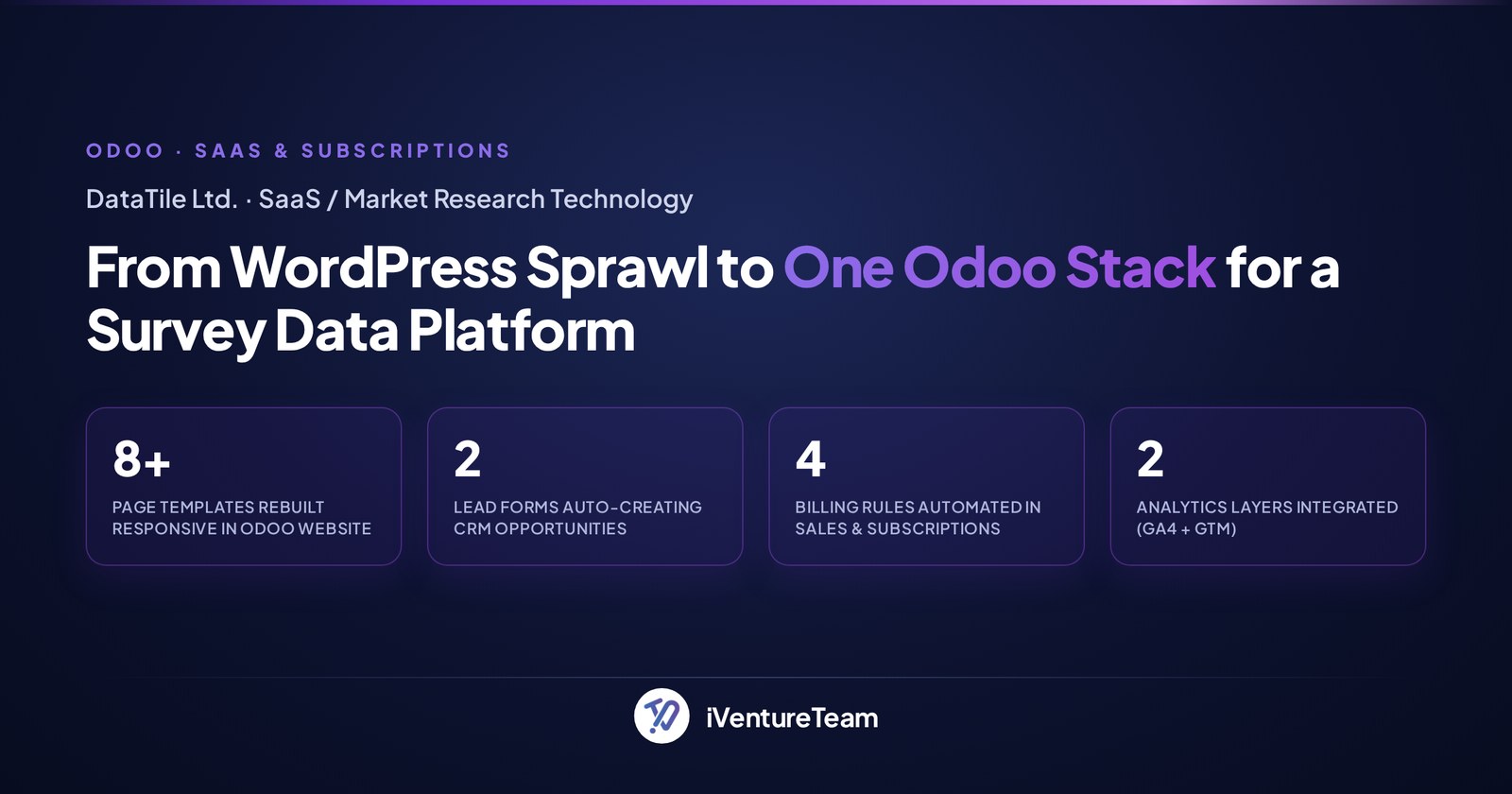
DataTile, a global survey-data platform, replaced a dated website with an Odoo-native stack where website lead forms and live chat feed straight into Odoo CRM as opportunities, wired through to Sales and Subscriptions. It shows the all-in-one advantage in practice.
iVentureTeam rebuilt the site on Odoo, connected two lead forms that create CRM opportunities automatically, added live chat, and built custom Sales and Subscription logic for tiered pricing and financial-year-aligned billing, with analytics wired in end to end.
The result is a pipeline that fills itself from the website, with no re-keying between marketing, sales, and billing, exactly what a connected CRM should do.
The bottom line on Odoo CRM
Odoo CRM is a capable, affordable sales tool whose real strength is being part of one suite, so leads, quotes, and invoices share the same data, and whose success depends on a clean setup and real team adoption. The features matter less than how you use them.
For a team that wants its pipeline connected to the business without enterprise pricing, Odoo CRM is a strong choice. Set it up simply, keep the pipeline disciplined, and customize only where it earns its place. Automation on top, such as AI-driven Odoo workflows, comes next.
Ready to get more from your Odoo CRM?
You do not have to set up Odoo CRM alone. In a free 30-minute Odoo CRM session, a senior Odoo consultant will review how your team sells and show you how to configure the pipeline, lead scoring, and integrations for real adoption.
Book your free Odoo CRM setup call, call +91-93270-18076, or email business@iventureteam.com.
Frequently Asked Questions about Odoo CRM
What is Odoo CRM?
+
Odoo CRM is the sales application within the Odoo business suite. It lets teams capture leads, manage a visual sales pipeline, schedule follow-up activities, send and receive email, and score opportunities by their probability of winning, all connected to Odoo Sales, Invoicing, and the wider suite.
Is Odoo CRM free?
+
Yes. The open-source Community edition is free to self-host and includes the CRM app, and the one-app-free plan on Odoo Online lets you run CRM alone at no cost. Costs begin when you add other apps, or move to a paid Enterprise plan for hosting, support, and extra features.
Is Odoo a CRM or an ERP?
+
Both. Odoo is a full ERP and business suite, and CRM is the sales app inside it. That is the key benefit: your CRM shares one database with sales, invoicing, inventory, and more, so data is entered once and used everywhere.
Does Odoo CRM include email integration?
+
Yes. Salespeople can send and receive email directly from an opportunity, and incoming email can create or update leads through an email alias. This keeps every message tied to the right deal instead of scattered across inboxes.
How does Odoo CRM compare to Salesforce or Zoho?
+
Odoo CRM is easier to unify with the rest of your business and far cheaper to start, since the core is open source. Salesforce and Zoho offer deeper standalone sales-engagement tooling. For most small and mid-sized teams wanting one connected system, Odoo is a strong, affordable fit.
How much does Odoo CRM cost for a sales team?
+
The Community edition and the one-app-free plan cost nothing. Paid Enterprise plans are priced per user per month and add hosting, support, mobile, and extra features, with the real investment usually being setup, customisation, and integration rather than the licence alone.
Ready to put this into action?
Talk to iVentureTeam about Odoo, AI automation, or custom development — get a free, no-obligation consultation.
Continue reading

Odoo 25% Legacy Surcharge: What It Costs Odoo 17 and Older Users (2026 to 2027)
Read article
Failed Odoo Implementation: What a Broken Go-Live Actually Costs (4 Rescue Projects)
Read article