
Odoo WhatsApp Integration: A Business Owner's Guide to Automating Sales & Support Conversations (2026)
 Siddharth JambukiyaOdoo Techno-Functional Consultant




As a business owner, you do not need to code any of this, but you do need to know the options so you buy the right one. This guide walks them in simple language.
For the build itself, our Odoo integration services connect WhatsApp to your workflows. The sections below help you decide what you actually need first.
What Odoo WhatsApp integration means for your business
Odoo WhatsApp integration means connecting your Odoo system to WhatsApp so records like leads, orders, and tickets can send and receive WhatsApp messages automatically. It turns WhatsApp from a personal chat app into a channel your ERP can drive.
First, clear up the three things people all call "WhatsApp," because they are not the same and the difference decides everything.
The WhatsApp Business app is the free phone app. It is manual, tied to one device, and cannot connect to Odoo or automate anything.
The WhatsApp Business API, also called the Cloud API, is Meta's official API for businesses. It is what any automation, including Odoo, actually connects to.
Odoo's native WhatsApp app is the module inside Odoo that talks to that API, so messages flow from CRM, Sales, and Invoicing.
If automation is the goal, you need the Business API. The next question is how you connect it to Odoo.
Your four ways to connect Odoo and WhatsApp, and which fits you
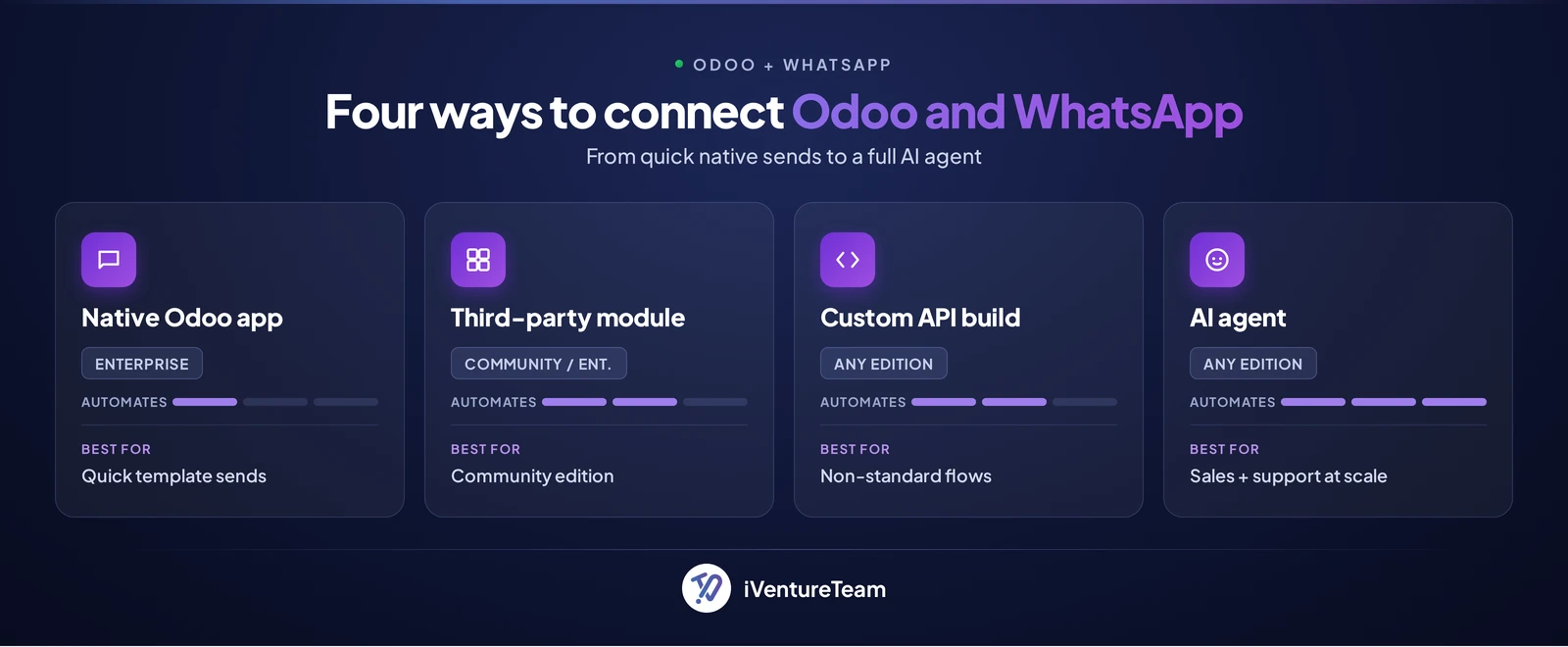
There are four ways to connect Odoo and WhatsApp: the native Odoo app, a third-party Apps-store module, a custom Business API integration, or a full AI agent. Each trade cost against how much it can automate.
Native Odoo WhatsApp app: built in on Enterprise, ideal for template messages from CRM, Sales, and Invoicing. Fastest to switch on.
Third-party module: an Odoo Apps-store app, the usual route for Community edition or for features the native app lacks.
Custom Business API integration: a tailored build for non-standard flows and deep automation, often via our Odoo customization services.
AI agent: the Business API plus an AI layer that holds real conversations, qualifies leads, and answers support around the clock.
The native app is the quickest start, which raises the question almost every Community user asks next.
Can you use WhatsApp on Odoo Community?
Odoo's native WhatsApp app is an Enterprise feature, so on Community edition you connect WhatsApp through a third-party Apps-store module or a custom Business API integration. The capability is not missing, it simply sits outside the free edition.
If you run Community and want WhatsApp, you have two clean paths, a paid third-party module or a custom build, and both still run on Meta's Business API underneath. If your edition choice is still open, our Odoo Community vs Enterprise guide weighs the wider trade-offs.
Whichever edition you run, the payoff is the same, so here is what you can actually automate, starting with sales.
What you can automate in sales conversations
On the sales side, Odoo plus WhatsApp can capture leads into CRM, send quotations and order confirmations, share payment links, and chase quiet enquiries automatically. The result is fewer missed leads and faster replies on a channel people actually read.
A WhatsApp enquiry creates or updates a lead in Odoo CRM, so nothing gets stuck in a personal inbox.
Quotations and order confirmations go out as WhatsApp messages the moment they are ready, not hours later by email.
Payment links and invoices reach the customer in the same thread, shortening the path to paid.
Automated follow-ups nudge quiet leads and recover deals a busy representative would otherwise forget.
Why it matters: WhatsApp messages are opened around 98% of the time, against roughly 20% for email, so a message sent is a message seen. The same connection works just as hard on support.
What you can automate in support conversations
On support, Odoo plus WhatsApp can answer common questions, share order and delivery status, log tickets, and route the hard cases to a person with full context. It deflects the routine volume so your team spends time only where it counts.
Customers check order or delivery status by message, with no agent involved.
Frequently asked questions get instant answers drawn from your own content.
A new issue opens a helpdesk ticket in Odoo automatically, tagged and prioritized.
Anything the automation cannot resolve hands off to a person, carrying the full conversation so the customer never repeats themselves.
The pattern is simple: deflect the routine, roughly 80% of contacts, and let your people handle the 20% that genuinely need judgment. Template messages are one thing, though; real conversations are another, and that is where AI comes in.
Where a basic integration ends and an AI agent begins
A basic integration sends and receives structured or template messages, while an AI agent holds an open two-way conversation, understands intent, and replies in natural language 24/7. The gap between them is the gap between notifications and a real assistant.
A template sent is perfect for an order confirmation, but it cannot answer "do you deliver to Dubai, and what is the price for size 9?" An AI agent can, then qualify the lead, book a slot, or raise a ticket. For businesses in India and the UAE, it also replies in Hindi, Arabic, or English.
Our WhatsApp AI agent builds that layer, and our AI in Odoo work wires it into your ERP data. All of which raises the fair question of cost.
How much does Odoo WhatsApp integration cost?
Odoo WhatsApp integration has two cost layers: what you pay Meta per message, and what the build costs, which for a WhatsApp AI agent typically runs $1,800 to $15,000 depending on scope. Neither is a one-time licence, so budget for both.
Meta conversation charges: the WhatsApp Business API is priced by Meta per message, usually a few cents each and varying by country and message category, so this running cost tracks your message volume.
The build: switching on the native app costs little beyond your Enterprise licensing, a third-party Apps-store module is a modest one-time fee, and a custom integration or AI agent is a project priced by scope.
Typical AI agent build: a single-flow WhatsApp pilot runs about $1,800 to $5,000 to set up plus $200 to $600 per month, while a full multi-flow suite with CRM, payments, and broadcasts runs about $5,000 to $15,000.
Those figures are indicative ranges; your exact number depends on flows, integrations, and volume. Before any of it, a few things need to be in place to go live safely and stay compliant.
What you need to set it up (and stay compliant)
To go live you need a WhatsApp Business API account, a verified business and phone number, Meta-approved message templates, and customer opt-in. Getting these right is what keeps your number healthy and in good standing.
Meta approves the templates you use for outbound messages, expects clear opt-in from customers, and enforces a 24-hour window for free-form replies. Respect those rules and your number stays healthy; ignore them and your quality score falls.
Odoo's own WhatsApp documentation covers the native setup, and a partner can handle Meta verification and templates for you.
That raises a practical question: how much of this should you take on yourself?
Should you set this up yourself or bring in help?
If you only need template messages from the native Enterprise app, you can likely set it up yourself; AI flows, Community-edition integration, and custom automation are where a partner pays off. Match the help to the ambition.
Do it yourself by turning on the native app and sending order or invoice templates from Odoo.
Bring in help for Community-edition connections, custom sales and support flows, in-chat payments, or an AI agent that holds real conversations.
You can also hire Odoo developers for a fixed scope rather than an open-ended retainer. When you do want it built end to end, here is how we approach it.
How iVentureTeam helps you automate WhatsApp on Odoo
iVentureTeam builds the whole range, from native WhatsApp setup to custom Business API integrations and full AI agents wired into your Odoo data. You tell us which conversations to automate; we make Odoo run them.
Our expert odoo developers team connects WhatsApp to your CRM, Sales, Invoicing, and Helpdesk, designs the flows, handles Meta onboarding and templates, and adds an AI layer when you want true two-way conversations. We build it around your workflows, not a generic template.
This is not theory; we recently wired WhatsApp straight into a manufacturer's Odoo system.
Odoo WhatsApp automation in practice: Chetan Plastics
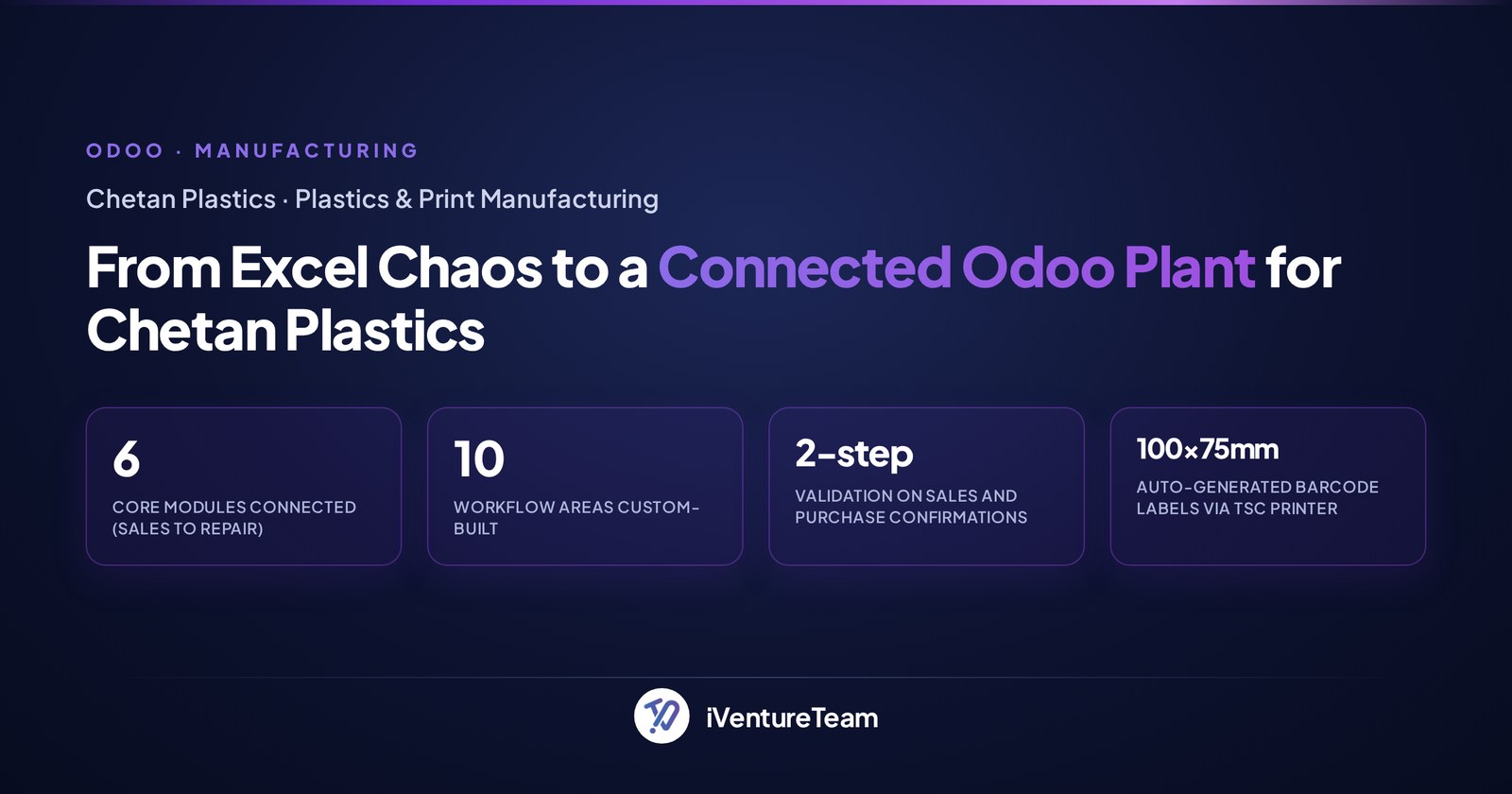
Chetan Plastics, an Ahmedabad plastics-printing manufacturer, moved off Excel onto a customized Odoo system that fires automatic WhatsApp messages to vendors with purchase-order details. It is a working example of WhatsApp automation driven by Odoo, not by hand.
Before the project, Chetan had no WhatsApp integration and handled delivery notes, approvals, and messaging manually. iVentureTeam built a connected Odoo across Sales, Purchase, Inventory, Manufacturing, and Repair, with automatic WhatsApp messages to vendors carrying PO and note details.
Now vendors get an instant WhatsApp update the moment a PO is confirmed, and every job is traceable from CRM enquiry to delivery. The same Odoo-to-WhatsApp automation that notifies vendors can drive customer sales and support flows.
The bottom line on Odoo WhatsApp integration
Odoo WhatsApp integration lets you run real sales and support conversations automatically on the channel your customers actually open. Pick the connection that fits your edition and ambition, respect Meta's rules, and add AI when you want genuine two-way automation.
You do not need to become technical. You need to know that automation runs on the Business API, that Community edition needs a third-party or custom route, and that an AI agent is what turns messages into conversations.
Ready to automate WhatsApp on your Odoo?
You do not have to figure out the API, templates, and flows alone. In one free 30-minute Odoo consultation, a senior Odoo consultant will map your top WhatsApp sales and support use cases and outline a realistic plan.
Book your free consultation, call +91-90235-15208, or email business@iventureteam.com.
Frequently Asked Questions about Odoo WhatsApp integration
Can you use WhatsApp on Odoo Community edition?
+
Not with the native app, which is an Enterprise feature. On Community you connect WhatsApp through a third-party module from the Odoo Apps store or a custom WhatsApp Business API integration. Both still run on Meta's official API underneath.
What is the difference between the WhatsApp Business app and the Business API?
+
The WhatsApp Business app is the free, manual phone app for one device. The WhatsApp Business API, or Cloud API, is Meta's official API that lets software like Odoo send and receive messages automatically. Any automation needs the API, not the app.
How much does Odoo WhatsApp integration cost?
+
There are two layers. Meta charges per message, usually a few cents and varying by country and message type. The build ranges from little beyond Enterprise licensing for the native app to about $1,800 to $15,000 for a WhatsApp AI agent, depending on scope.
Does Odoo have a native WhatsApp integration?
+
Yes. Odoo Enterprise includes a native WhatsApp app that connects to the WhatsApp Business API and sends messages from CRM, Sales, Invoicing, and more. Community edition does not include it and uses a third-party module or a custom build.
Will Meta ban my WhatsApp number?
+
Not if it is set up correctly. Use Meta-approved templates for outbound messages, collect clear customer opt-in, and reply within the 24-hour window for free-form messages. Following these rules keeps your quality score and your number healthy.
Can a WhatsApp agent reply in Hindi or Arabic?
+
Yes. An AI agent on WhatsApp can understand and reply in Hindi, Arabic, English, and many other languages automatically, matching each customer, which matters for businesses across India, the UAE, and beyond.
What can I automate on WhatsApp with Odoo?
+
On sales: lead capture into CRM, quotations, order confirmations, payment links, and follow-ups. On support: order status, FAQs, ticket creation, and handoff to a human with full context. An AI agent adds real two-way conversations.
Free integration feasibility review
Connecting your other systems to Odoo?
Tell us what needs to sync between your systems and Odoo. We recommend a connector, API or custom approach and plan how failures are handled.
Free, with no obligation. A senior consultant replies within 12 business hours.
Free Odoo tools
All tools- Odoo Health CheckVersion, modules, findings and upgrade cost
- Odoo App SelectorWhich apps you need, by industry
- Odoo Project EstimateIndicative cost and timeline in minutes
- Odoo Implementation Cost CalculatorImplementation cost and timeline, in minutes
- Odoo Migration Cost CalculatorVersion jump or legacy ERP, priced in minutes
Continue reading

Odoo KRA eTIMS Integration: OSCU vs VSCU, Setup Steps and Error Fixes
Odoo eTIMS Kenya guide: OSCU vs VSCU, supported Odoo versions, KRA registration steps, product codes, stock and credit note rules, and common rejection fixes.

What Can Odoo Replace? A Tool Consolidation Map and What Stays
What can Odoo replace? A map of the CRM, accounting, inventory, HR, helpdesk and eCommerce tools Odoo consolidates, what stays, and a migration order.

Odoo.sh Storage Full: Find What Uses Space, Clean Up, or Upgrade
Odoo.sh storage full? What counts, what it costs per GB, how to find what uses space, how to clean attachments safely, and when to upgrade to Dedicated.