
Odoo Module Development: A Practical Guide with Real Examples (2026)
 Siddharth JambukiyaOdoo Techno-Functional Consultant




This Odoo module development guide is designed for developers and technical decision-makers, with practical, real code you can run. If you are mainly looking for the key decision points, skip ahead to the section on costs and whether to build in-house or hire an Odoo development partner.
The sections below walk you through building your first Odoo module step by step. If you are planning a production build, our Odoo development company builds, customizes, and maintains enterprise-grade modules for businesses worldwide.
What an Odoo module is, and why you would build one
An Odoo module is a self-contained package that adds new models, fields, views, or logic to Odoo, and you build one when the standard configuration cannot express how your business actually works. Everything in Odoo, even its core apps, is a module.
That modular design is why the ecosystem is enormous: beyond Odoo's own apps, the community has published more than 50,000 modules to the official Odoo Apps store, the largest business app store of its kind.
You reach for a custom module when Studio and settings run out of room: a new object Odoo does not have, a pricing rule specific to your trade, an automated workflow, or an integration with another system. A module lets you add exactly that, cleanly, and remove it just as cleanly.
The key idea is separation. Your module sits alongside Odoo's code, not inside it, so you get new behaviour without forking the platform. That is what makes the whole thing upgrade-safe, and it starts with the file structure.
Anatomy of an Odoo module: the file structure
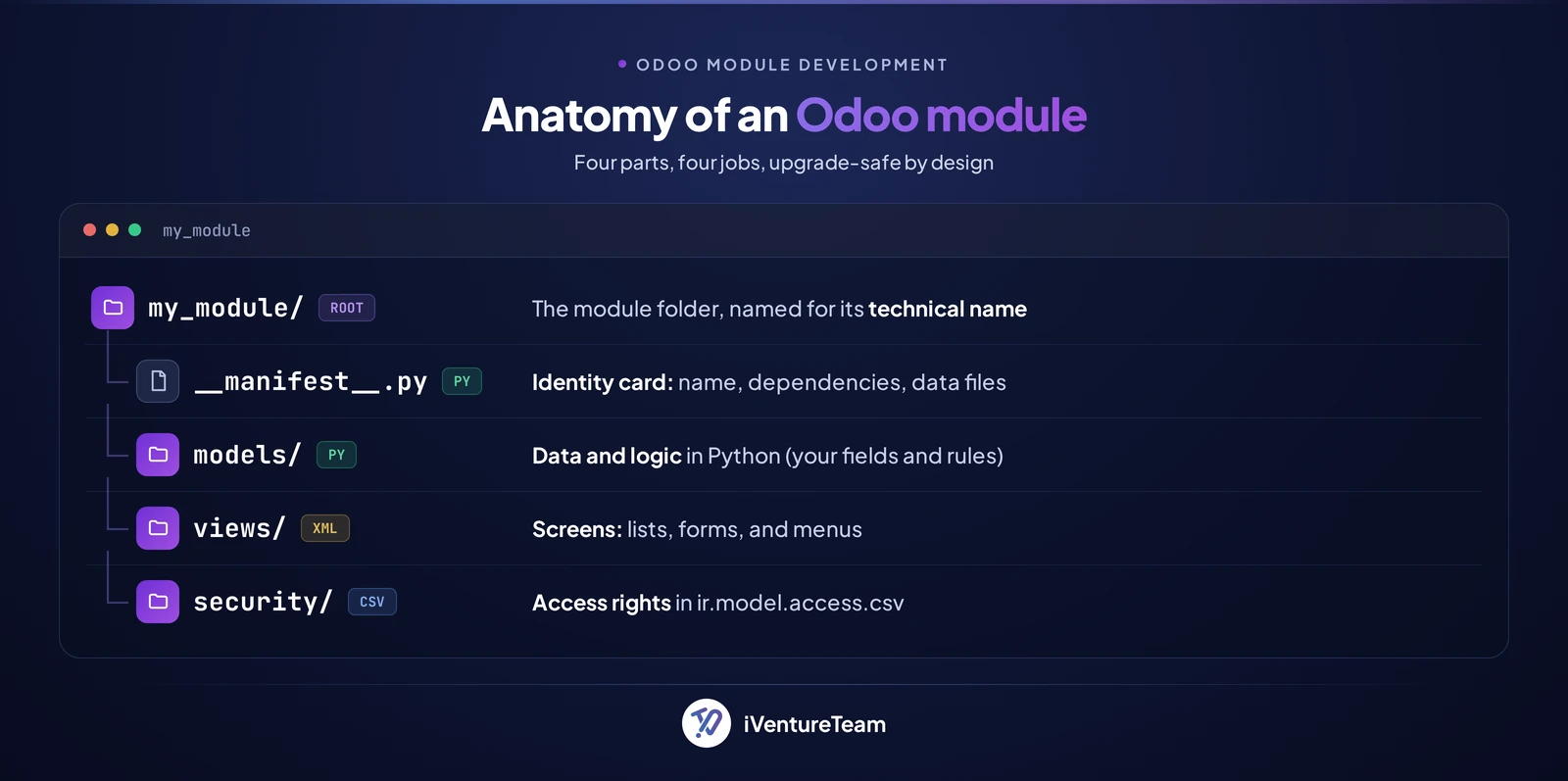
A minimal Odoo module is a folder whose name is the module's technical name, containing a manifest, an `__init__.py`, and subfolders for models, views, and security. Once you know these files, every Odoo module you open looks familiar.
Here is the structure of a small module we will build, a simple library:
my_library/
  __init__.py            # imports the models package
  __manifest__.py        # module metadata and data files
  models/
    __init__.py          # imports each model file
    library_book.py      # the Python model
  security/
    ir.model.access.csv  # who can read/write the model
  views/
    library_book_views.xml  # list, form, action, and menu
Each part has one job: the manifest declares the module, models/ holds your data structures, views/ describes the screens, and security/ controls access. With the map in hand, you can build the module itself.
Build your first module, step by step
To build a module you scaffold the folder, write a manifest, define a model, add access rights and a view, then install it with Odoo in developer mode. Below is a complete, working example you can adapt.
First, scaffold the skeleton with Odoo's own command, which saves you typing the boilerplate (the full flow is covered in Odoo's developer documentation):
odoo-bin scaffold my_library /path/to/your/addonsThe manifest (__manifest__.py) is the module's identity card. It names the module, lists dependencies, and points to the files Odoo should load:
{
    "name": "Library",
    "version": "1.0",
    "summary": "Manage a small library of books",
    "depends": ["base"],
    "data": [
        "security/ir.model.access.csv",
        "views/library_book_views.xml",
    ],
    "application": True,
    "license": "LGPL-3",
}
The model (models/library_book.py) defines your data and logic. This one adds a book, a computed count of available copies, and a rule that stops you lending more copies than you own:
from odoo import models, fields, api
from odoo.exceptions import ValidationError

class LibraryBook(models.Model):
    _name = "library.book"
    _description = "Library Book"

    name = fields.Char(string="Title", required=True)
    author_id = fields.Many2one("res.partner", string="Author")
    isbn = fields.Char(string="ISBN")
    copies_total = fields.Integer(string="Total Copies", default=1)
    copies_on_loan = fields.Integer(string="On Loan", default=0)
    copies_available = fields.Integer(
        string="Available", compute="_compute_available", store=True
    )

    @api.depends("copies_total", "copies_on_loan")
    def _compute_available(self):
        for book in self:
            book.copies_available = book.copies_total - book.copies_on_loan

    @api.constrains("copies_on_loan", "copies_total")
    def _check_copies(self):
        for book in self:
            if book.copies_on_loan > book.copies_total:
                raise ValidationError("Copies on loan cannot exceed total copies.")
Access rights (security/ir.model.access.csv) tell Odoo who can use the model. Without this file, no one but the superuser sees your data:
id,name,model_id:id,group_id:id,perm_read,perm_write,perm_create,perm_unlink
access_library_book,library.book,model_library_book,base.group_user,1,1,1,1
The view (views/library_book_views.xml) gives the model a list, a form, and a menu. Note the list tag, which replaced tree in recent Odoo versions:
<odoo>
  <record id="view_library_book_list" model="ir.ui.view">
    <field name="name">library.book.list</field>
    <field name="model">library.book</field>
    <field name="arch" type="xml">
      <list>
        <field name="name"/>
        <field name="author_id"/>
        <field name="copies_available"/>
      </list>
    </field>
  </record>

  <record id="view_library_book_form" model="ir.ui.view">
    <field name="name">library.book.form</field>
    <field name="model">library.book</field>
    <field name="arch" type="xml">
      <form>
        <sheet>
          <group>
            <field name="name"/>
            <field name="author_id"/>
            <field name="isbn"/>
            <field name="copies_total"/>
            <field name="copies_on_loan"/>
            <field name="copies_available"/>
          </group>
        </sheet>
      </form>
    </field>
  </record>

  <record id="action_library_book" model="ir.actions.act_window">
    <field name="name">Books</field>
    <field name="res_model">library.book</field>
    <field name="view_mode">list,form</field>
  </record>

  <menuitem id="menu_library_root" name="Library"/>
  <menuitem id="menu_library_books" parent="menu_library_root" action="action_library_book"/>
</odoo>
Finally, install it. Turn on developer mode, then install the module from the command line, using -i the first time and -u to apply later changes:
odoo-bin -i my_library -d your_databaseRefresh Odoo and the Library menu appears. That is a real module. The next step is changing behaviour Odoo already has.
Extend Odoo the right way: inherit, do not overwrite
To change an existing Odoo model, you inherit it with `_inherit` and add your fields or logic, rather than editing Odoo's own files. Inheritance is the single most important habit in Odoo development.
This snippet adds a "books authored" count to the standard contact, without touching the contact's original code:
from odoo import models, fields

class ResPartner(models.Model):
    _inherit = "res.partner"

    book_count = fields.Integer(
        string="Books Authored", compute="_compute_book_count"
    )

    def _compute_book_count(self):
        for partner in self:
            partner.book_count = self.env["library.book"].search_count(
                [("author_id", "=", partner.id)]
            )
Because you inherited instead of overwriting, an Odoo upgrade cannot wipe your change, and other modules can still extend the same model. That discipline is the heart of the best practices below.
Odoo module development best practices
The best practices that matter most are: never edit core files, inherit instead, name things clearly, secure every model, and write tests so upgrades stay safe. They cost a little time now and save projects later.
Never touch Odoo core: Put every change in your own module and inherit what you need. Editing core breaks the next upgrade.
Name with a prefix: Use a consistent technical prefix for models and files so your work is easy to find and does not clash.
Secure every model: Give each model an ir.model.access.csv entry, and use record rules when different users should see different rows.
Keep data files ordered: Odoo loads them in sequence, so define a model before its fields and its fields before the views that use them.
Write tests: Odoo's test framework catches regressions, which matters most the day you upgrade to the next version.
Follow these and your module ages well. Ignore them and you meet the mistakes in the next section.
Common mistakes that break modules and upgrades
The most common module-breaking mistakes are editing core code, forgetting access rights, hard-coding IDs, skipping tests, and overloading one module with unrelated features. Each one is avoidable once you know it.
Editing core is the classic trap: it works today and breaks on the first upgrade. Forgetting the access CSV means the model is invisible to normal users. Hard-coding database IDs instead of using external identifiers makes a module fragile across databases.
Overstuffed modules are the quiet killer. When one module does ten unrelated things, every change risks the others. Keep modules focused, and you keep them maintainable, which raises a fair question: do you even need to hand-code?
When you do not need to hand-code: Studio and AI
For simple changes, Odoo Studio adds fields, views, and basic automation with no code, and AI-assisted tools can now scaffold modules from a plain-English description. Hand-coding is not always the right first move.
Studio is ideal for adding a field to a form, tweaking a report, or building a small custom screen that business users maintain, and it writes standard Odoo structures behind the scenes, so it stays upgrade-safe.
Recent Odoo.sh tooling even lets developers generate module code with AI assistants, then review and refine it by hand.
The line is simple: use Studio or AI for small, well-understood changes, and hand-code when logic, performance, integrations, or upgrade-safety are on the line. That naturally leads to the question of cost.

How long and how much does a custom Odoo module cost?
A custom Odoo module typically costs about $500 to $15,000, from a few days of work for a simple one to a few weeks for a complex build, and the real cost is upgrade-safe engineering, not lines of code. Scope drives the number.
Simple module, 2 to 5 days: a new model with a few fields, a view, and access rights, roughly $500 to $5,000.
Business-logic module, 1 to a few weeks: computed fields, workflows, and inheritance across several models, roughly $5000 to $15,000.
Integration or heavy customization, multi-week: external APIs, data pipelines, and migration-safe overrides, priced by scope and often $15,000 and up.
These are indicative ranges; your figure depends on complexity, integrations, and testing. For a full breakdown, see our Odoo implementation cost guide.
On the build-versus-hire question, be honest with yourself. Adding a field or a small report is well within reach of an in-house developer or Studio. Complex logic, core-method overrides, security, and staying upgrade-safe are where you hire Odoo developers or a partner.
If you are weighing firms, our guide on how to choose an Odoo development company gives you a checklist.
How iVentureTeam helps you build Odoo modules
iVentureTeam designs, builds, and maintains custom Odoo modules that solve a specific problem and stay clean through every upgrade. You bring the requirement; we ship production-grade code you own.
Our Odoo developers scope the module, model your data and logic properly, inherit rather than overwrite, secure every object, and write the tests that keep it stable. Our Odoo customization services cover everything from a single field to a full custom application.
That discipline is exactly what the following project relied on.
A custom Odoo module in practice: Mechanical Products
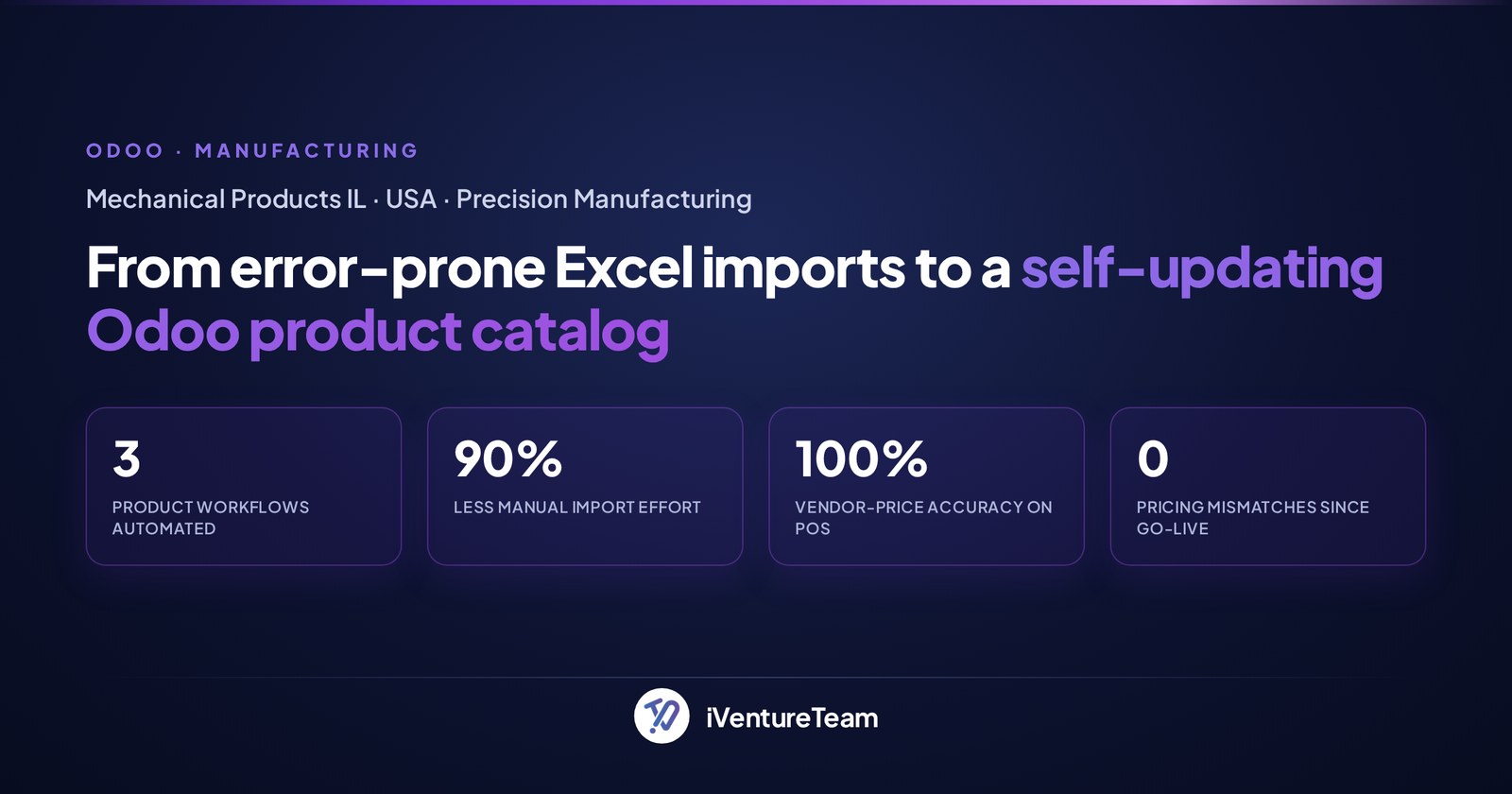
Mechanical Products, a US precision-machining firm, replaced broken Excel product imports with a custom Odoo module that creates, updates, and archives its catalog automatically, cutting manual import effort by 90%. It shows what a well-built module does in production.
Their catalog ran on manual Excel imports that assigned wrong data and never updated prices, so quotes and purchase orders went out wrong.
iVentureTeam built a custom product-lifecycle module with scheduled actions that sync prices, plus careful overrides so purchase orders always pull the latest vendor price.
The result: product imports run themselves, every quote and purchase order reflects current pricing, and there have been zero pricing mismatches since go-live. That is the payoff of clean, upgrade-safe module development.
The bottom line on building Odoo modules
Odoo module development comes down to a manifest, a model, a view, access rights, and one rule: extend by inheriting, never by editing core. Get that right and your modules add real capability while surviving every upgrade.
Start small with the library example, use Studio or AI for the trivial changes, and reserve hand-coded modules for the logic that genuinely needs them. When a build has to be right and upgrade-safe, that is where a partner pays for itself.
Ready to build a custom Odoo module?
You do not have to design the model, security, and upgrade path alone. In one free 30-minute consultation, a senior Odoo consultant will scope your module and outline a clean, upgrade-safe build.
Book your free consultation, call +91-90235-15208, or email business@iventureteam.com.
Frequently Asked Questions about Odoo Module Development
Do I need to know Python to build an Odoo module?
+
For real logic, yes. Odoo models and business rules are written in Python, with views and data in XML. For simple changes like adding a field or a report, Odoo Studio needs no code, and AI-assisted tools can scaffold basic modules you then review.
What files does a minimal Odoo module need?
+
At minimum, a folder with __manifest__.py, an __init__.py, a model in a models/ folder, an ir.model.access.csv in security/, and a view XML in views/. The manifest lists the data files, and Odoo loads them in order to install them.
Should I edit Odoo core to change behaviour?
+
No. Always create your own module and inherit the model or view you want to change using _inherit. Editing core files breaks on the next upgrade and is the most common cause of failed Odoo projects.
Does custom module development work on Odoo Community?
+
Yes. Custom modules run on both Community and Enterprise, since the developer framework is the same. Some apps you might depend on are Enterprise-only, so check your dependencies before you build.
How much does a custom Odoo module cost?
+
A simple module runs about $500 to $5,000 (two to five days), a business-logic module about $5,000 to $15,000 (one to a few weeks), and integration-heavy builds are priced by scope. The real cost is upgrade-safe engineering and testing, not the raw code.
Which Odoo version should I develop for?
+
Develop for the version you run in production, ideally the latest stable release. Syntax evolves between versions, for example, list views replaced tree views, so match the docs and code to your exact version.
Free written answer from a certified consultant
Not sure which Odoo apps you need?
Tell us how your business runs. We recommend the apps, the edition and the order to roll them out.
Free, with no obligation. A senior consultant replies within 12 business hours.
Free Odoo tools
All tools- Odoo Health CheckVersion, modules, findings and upgrade cost
- Odoo App SelectorWhich apps you need, by industry
- Odoo Project EstimateIndicative cost and timeline in minutes
- Odoo Implementation Cost CalculatorImplementation cost and timeline, in minutes
- Odoo Migration Cost CalculatorVersion jump or legacy ERP, priced in minutes
Continue reading

Odoo KRA eTIMS Integration: OSCU vs VSCU, Setup Steps and Error Fixes
Odoo eTIMS Kenya guide: OSCU vs VSCU, supported Odoo versions, KRA registration steps, product codes, stock and credit note rules, and common rejection fixes.

What Can Odoo Replace? A Tool Consolidation Map and What Stays
What can Odoo replace? A map of the CRM, accounting, inventory, HR, helpdesk and eCommerce tools Odoo consolidates, what stays, and a migration order.

Odoo.sh Storage Full: Find What Uses Space, Clean Up, or Upgrade
Odoo.sh storage full? What counts, what it costs per GB, how to find what uses space, how to clean attachments safely, and when to upgrade to Dedicated.