
Will Odoo Keep You HMRC and MTD Compliant? A UK Accounting Guide (2026)
 Siddharth JambukiyaOdoo Techno-Functional Consultant




Before a UK business trusts Odoo with its accounts, one question outranks the rest: will it keep me on the right side of HMRC and Making Tax Digital? It is a fair worry, since one broken step can turn compliant software non-compliant. Our Odoo implementation services make sure it does not.
What HMRC and Making Tax Digital actually require
Making Tax Digital is HMRC's rule that VAT-registered businesses keep digital records and file their VAT returns using compatible software, with data flowing digitally and no manual re-typing between systems. It governs how you record and submit, not how much tax you pay.
Every VAT-registered business is now in scope, since the old turnover threshold was removed. You must keep digital records of your sales and purchases, and you must file through software that connects to HMRC's MTD system.
The part that trips people up is digital links: the numbers must move from record to return to HMRC digitally, end to end. Copying a figure into a spreadsheet by hand breaks that chain, even if your software is compatible. So the real question is whether Odoo is compatible.
Is Odoo HMRC-recognised and MTD-compatible?
Yes. Odoo's Making Tax Digital solution is recognised by HMRC and connects directly to HMRC, so your VAT return is filed from inside Odoo without bridging software. It passed HMRC's recognition process to get there.
Both Community and Enterprise can authenticate to HMRC using the free account_mtd connector module from the Odoo Apps store. You can confirm the recognition yourself on HMRC's find software for MTD for VAT list, and Odoo's own UK fiscal localization documentation covers the setup.
Being recognised is one thing; knowing how the filing actually happens is what tells you whether your setup is sound.
How Odoo files your VAT return to HMRC under MTD
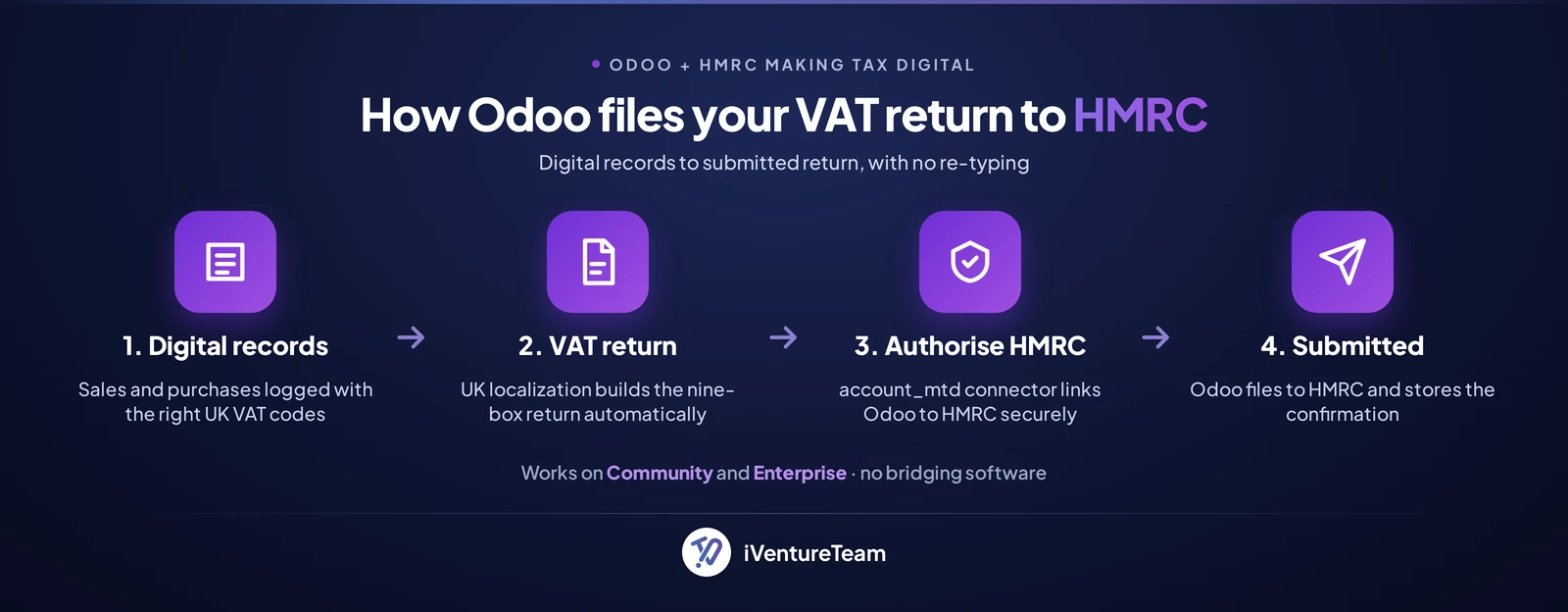
Odoo builds your nine-box VAT return from your digital records, then submits it to HMRC over the MTD API once you authorise the connection. The flow is the same on Community and Enterprise.
In practice it runs in four steps: your transactions are recorded with the correct UK VAT codes, the UK localization produces the VAT return from those records, you authorise Odoo to talk to HMRC through a secure one-time grant, and Odoo submits the return and stores HMRC's confirmation.
The return draws on the same ledgers that run your everyday Odoo accounting, so nothing is entered twice. Because it is built from those records rather than typed in, the digital link stays intact from invoice to submission, which is exactly what MTD asks for.
What you must set up to stay compliant
To be compliant you need the UK fiscal localization, the account_mtd connector, an authorised HMRC connection, and the discipline to keep records in Odoo rather than in spreadsheets. Each piece matters.
UK localization: selecting the United Kingdom loads a UK chart of accounts, the VAT rates (20%, 5%, 0%, and exempt), and the fiscal positions for domestic, EU, and non-EU trade.
The connector: install the free account_mtd module and authorise it with your HMRC credentials so Odoo can file on your behalf.
Digital records: record sales and purchases in Odoo so the digital link from transaction to return is never broken.
Reconcile first: match your bank and ledgers before filing so the return reflects reality.
For a setup tuned to your business, our Odoo consulting services handle the localization and HMRC connection. One question always follows: does Odoo handle my VAT scheme?
Does Odoo support the Flat Rate and Cash Accounting schemes?
MTD applies to every VAT scheme, and Odoo handles standard, flat rate, and cash accounting; the more complex schemes need configuration. Match the setup to how you actually account for VAT.
Standard VAT works out of the box once the UK localization is in place, and the Flat Rate Scheme and Cash Accounting can be configured so the return is calculated correctly.
Partial exemption, VAT groups, and margin schemes are where careful setup or an accountant earns their fee, and where our Odoo customization services come in.
Getting the scheme right keeps your VAT filing clean. There is, though, one part of Making Tax Digital that Odoo does not cover yet.
Where Odoo stops: MTD for Income Tax
Odoo files MTD for VAT, but it does not yet file MTD for Income Tax, the separate regime that begins in April 2026 for sole traders and landlords. Knowing which one applies to you avoids a nasty surprise.
MTD for Income Tax phases in by qualifying income: from April 2026 for those over £50,000, from April 2027 for those over £30,000, and from April 2028 for those over £20,000, per HMRC's Making Tax Digital for Income Tax guidance.
If you are a sole trader or landlord in scope, you will need dedicated income-tax software or your accountant for that filing.
Most Odoo users are VAT-registered companies, so VAT is the regime that applies to them, and Odoo covers it. That still leaves a handful of avoidable mistakes.
Common UK compliance mistakes, and how to avoid them
The most common MTD mistakes are breaking digital links, using the wrong VAT codes or scheme, filing from stale data, and letting the HMRC authorisation lapse. Every one is preventable, and it is worth avoiding them, because late or missed VAT returns now carry HMRC's points-based penalties.
Breaking digital links: exporting figures to a spreadsheet and re-keying them breaks compliance even with recognised software. Keep the chain digital from record to return.
Wrong VAT codes: mixing up zero-rated and exempt, or the wrong rate, quietly distorts the return. Map your codes once, correctly.
Filing stale data: reconcile bank feeds and ledgers before you submit, so the nine boxes match your books.
Lapsed authorisation: the HMRC grant expires periodically, so renew it before a filing deadline rather than during one.
Avoid those and MTD becomes routine. The fastest way to avoid them is a setup done right the first time.
How iVentureTeam helps UK businesses stay compliant on Odoo
iVentureTeam configures UK Odoo end to end: the localization, the HMRC connection, your VAT scheme, and clean digital records, so filing your VAT return is a click rather than a scramble. You get compliant plumbing and a team that understands it.
We install and configure the UK localization, add and authorise the MTD connector, map your VAT codes and scheme, reconcile your opening data, and train your finance team. When something changes, our Odoo support and AMC keeps the connection and returns healthy.
That same discipline, applied to a tax practice, is what the following project relied on.
Accounting compliance in practice: Fernando Tax
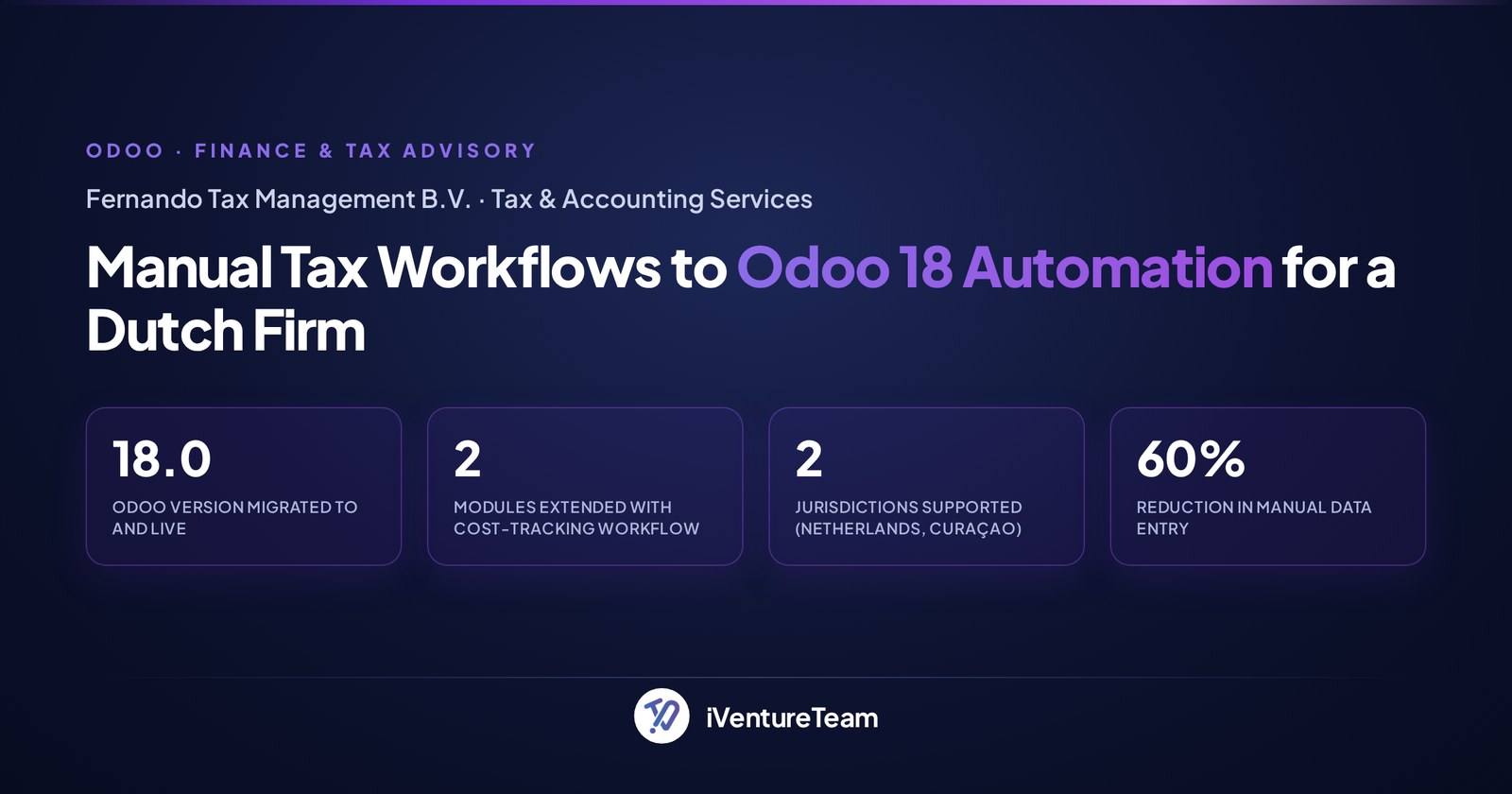
Fernando Tax, a Dutch tax advisory, replaced a manual, error-prone system with a customised Odoo 18 that runs its accounting and compliance reporting, cutting manual data entry by 60%. It is not a UK MTD project, but it shows Odoo running real, localized tax compliance for a tax practice.
Fernando Tax Management B.V., serving clients in the Netherlands and Curaçao, moved off an aging manual system onto Odoo 18. iVentureTeam handled the migration, built office cost tracking into Sales and Purchase, and delivered localized, compliance-ready reporting in multiple languages.
The relevance to a UK business is direct: the same disciplined, localized accounting that keeps a tax firm compliant across two jurisdictions is what keeps a VAT-registered company MTD-ready on Odoo.
The bottom line on Odoo and HMRC compliance
Odoo keeps you HMRC compliant for Making Tax Digital for VAT: it is recognised software, files directly to HMRC, and runs on Community and Enterprise, provided you keep proper digital records. For MTD for Income Tax, you will need to look beyond Odoo for now.
If you are a VAT-registered UK business, Odoo covers your filing. The work is in correct localization, the right VAT scheme, and disciplined records, and that is exactly where a partner pays for itself.
This guide is general information, not tax advice. Confirm your own obligations with HMRC or your accountant before you rely on it.
Ready to make your Odoo HMRC-ready?
You do not have to wire up HMRC, your VAT scheme, and your records alone. In a free 30-minute MTD readiness review, a senior odoo consultant checks your UK Odoo setup and maps a clean, compliant filing workflow.
Get your free MTD readiness review, call +91-93270-18076, or email business@iventureteam.com.
Frequently Asked Questions
Is Odoo MTD compliant and on HMRC's recognised list?
+
Yes. Odoo is recognised by HMRC for Making Tax Digital for VAT and appears on the official list of compatible software. It connects directly to HMRC and files your VAT return from inside Odoo, with no bridging software required.
Does Odoo MTD work on the Odoo Community edition?
+
Yes. Both Community and Enterprise can file VAT to HMRC using the free account_mtd connector module from the Odoo Apps store. The MTD capability comes from the connector plus the UK localization, not from the edition.
Which Odoo module submits VAT to HMRC?
+
The account_mtd connector module. It authenticates to HMRC's Making Tax Digital system and submits the VAT return that Odoo builds from your records. It is free to install from the Odoo Apps store, alongside the UK fiscal localization.
Does Odoo support the Flat Rate Scheme?
+
Yes. MTD applies to all VAT schemes, and Odoo handles standard, flat rate, and cash accounting. Standard VAT works out of the box; flat rate and cash accounting are configured during setup. Complex schemes like partial exemption need extra work.
Does Odoo file MTD for Income Tax (ITSA)?
+
No, not yet. Odoo files MTD for VAT, not MTD for Income Tax. Income Tax MTD phases in from April 2026 for income over £50,000, April 2027 over £30,000, and April 2028 over £20,000, and needs dedicated software or an accountant.
How much does MTD in Odoo cost?
+
The native account_mtd connector is free to install, so MTD filing adds no licence cost beyond your Odoo subscription. Some third-party MTD modules and support packages are paid, and configuration or accountant time is the main real cost.
Do I still need an accountant with Odoo?
+
For standard VAT, Odoo prepares and files the return itself. You still want an accountant for complex VAT positions, MTD for Income Tax, and year-end work. Odoo handles the filing mechanics; judgement calls remain human.
Ready to put this into action?
Talk to iVentureTeam about Odoo, AI automation, or custom development — get a free, no-obligation consultation.
Continue reading

Odoo Upgrade Cost: Complete Guide for All Types of Business Owners [2026]
Read article
Why Growing Businesses Should Upgrade Their Odoo Version: The Ultimate Business Owner's Guide (2026)
Read article