
Odoo Accounting Workflow: How It Works from Invoice to Financial Statements (2026)
 Siddharth JambukiyaOdoo Techno-Functional Consultant




Most finance teams evaluate Odoo on a features list, but the real question is how a transaction actually travels from a quotation to an audit-ready financial statement. This Odoo accounting guide walks that full path, stage by stage.
If you are planning a move to Odoo, our Odoo implementation services set the accounting foundation, and our Odoo consulting services map your existing processes before build.
The Odoo accounting workflow at a glance
The Odoo accounting workflow has ten stages, each turning a business action into a verified accounting record. Here is the full path at a glance before the detailed walk-through.
Stage | What happens | Key output |
|---|---|---|
1. Company setup | Chart of accounts, taxes, journals, bank accounts, fiscal positions configured once | A ready ledger structure |
2. Business transactions | Sales, purchase, and manual documents created | Source documents |
3. Journal entry generated | Each document becomes a balanced draft entry with analytic tags | Draft journal entry |
4. Validate and post | Draft becomes posted, sequenced, and immutable | Auditable ledger entry |
5. General ledger updated | Every posted entry lands in the general ledger in real time | Single running ledger |
6. Receivables, payables and tax | AR, AP, and tax accounts update together | Live balances and tax report |
7. Payment registration | Customer receipt or vendor payment recorded | Invoice marked In Payment |
8. Bank reconciliation | Books matched against the bank statement | Invoice marked Paid |
9. Period-end close | Accruals, depreciation, revaluation, and lock dates | A locked, closed period |
10. Financial reporting | Statements generated live from posted entries | P&L, balance sheet, tax report |
What is the Odoo accounting workflow?
The Odoo accounting workflow is the end-to-end path a transaction follows inside Odoo, from a source document to a posted journal entry to a live financial statement. It is built on double-entry accounting, so every entry has balanced debits and credits.
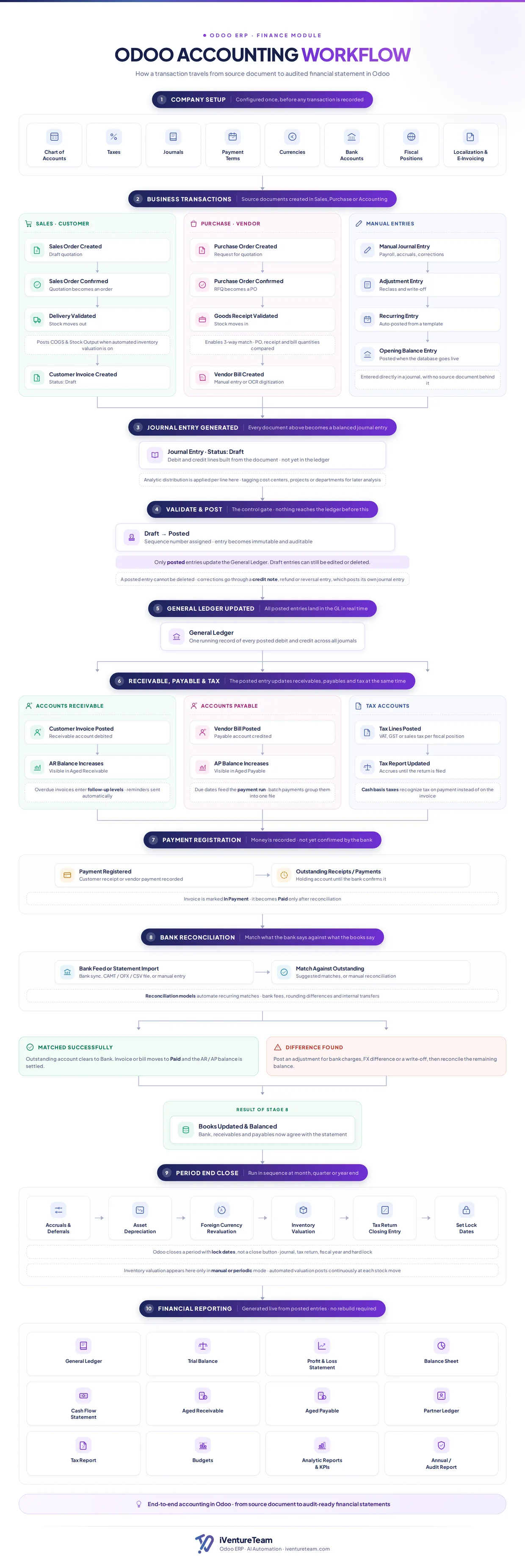
The workflow matters because Odoo accounting is not a standalone ledger. It is wired into Sales, Purchase, and Inventory, so a confirmed sales order, a validated delivery, and a vendor bill all feed the same accounting engine automatically.
The infographic above maps the whole journey. The sections below explain each stage, verified against the official Odoo 19 accounting documentation.
The Odoo accounting workflow, stage by stage
Each stage below turns a business event into a controlled accounting record, in the order Odoo processes it. Follow them top to bottom and you have the full lifecycle of a transaction.
Stage 1: Company setup
Company setup is the one-time configuration that must exist before any transaction is recorded: chart of accounts, taxes, journals, payment terms, currencies, bank accounts, and fiscal positions. Get this right and everything downstream flows correctly.
Your chart of accounts defines where every debit and credit lands. Taxes and fiscal positions decide how VAT or sales tax is applied per customer and country, and localization settings add region-specific rules and e-invoicing.
This stage is where most implementation quality is won or lost, which is why it is worth configuring with a specialist rather than by trial and error.
Stage 2: Business transactions
Business transactions are the source documents created in Sales, Purchase, or Accounting that start every accounting record. In Odoo, the paperwork of running the business is also the trigger for the books.
On the sales side, a quotation becomes a confirmed sales order, a validated delivery posts the cost of goods sold and stock output when automated inventory valuation is on, and a customer invoice is created in draft.
On the purchase side, a purchase order is confirmed, a goods receipt is validated to enable the three-way match, and a vendor bill is entered manually or by OCR. Manual entries cover payroll, accruals, adjustments, recurring templates, and the opening balance at go-live.
Stage 3: Journal entry generated
Every document from the previous stage becomes a balanced journal entry in draft, with debit and credit lines built from the document but not yet in the ledger. This is where business paperwork turns into accounting.
Analytic distribution is applied per line here, tagging each amount to a cost center, project, or department. That tagging is what makes later profitability and management reporting possible, so it is worth setting up early.
Stage 4: Validate and post
Validate and post is the control gate of Odoo accounting: a draft entry becomes posted, receives a sequence number, and turns immutable and auditable. Nothing reaches the general ledger before this step.
Only posted entries update the ledger. Draft entries can still be edited or deleted, but once posted, an entry cannot be deleted. Corrections go through a credit note, refund, or reversal entry, which posts its own balanced journal entry and leaves a clean audit trail.
Stage 5: General ledger updated
Once posted, every entry lands in the general ledger in real time, forming one running record of all debits and credits across all journals. There is no batch update and no overnight rebuild.
Because the ledger is always current, the balances your team sees are the balances that reporting uses. That live link is the foundation of everything in the reporting stage.
Stage 6: Receivables, payables, and tax
A single posted entry updates receivables, payables, and tax at the same time, keeping all three in sync. This is where the ledger becomes actionable balances.
A posted customer invoice debits the receivable account and increases the aged receivable balance, and overdue invoices enter follow-up levels that send reminders automatically. A posted vendor bill credits the payable account, and due dates feed the payment run that batches payments into one file.
Tax lines post per fiscal position, the tax report accrues until the return is filed, and cash-basis taxes recognize tax on payment instead of on the invoice. Everything updates from the same entry, so nothing drifts out of balance.
Stage 7: Payment registration
Payment registration records that money has moved, but the invoice is not yet confirmed by the bank. In Odoo, recording a payment and confirming it are two separate steps, which is what keeps the books accurate.
A registered customer receipt or vendor payment sits in an outstanding receipts or payments holding account until the bank confirms it. The invoice is marked In Payment at this point, and it becomes Paid only after reconciliation.
Stage 8: Bank reconciliation
Bank reconciliation matches what the bank says against what the books say, and it is the step that finally marks an invoice as Paid. It is where recorded payments meet reality.
Odoo imports the bank feed by sync, CAMT, OFX, or CSV file, or by manual entry, then suggests matches against outstanding items. Reconciliation models automate recurring matches such as bank fees, rounding differences, and internal transfers.
When an item matches, the outstanding account clears to the bank, the invoice or bill moves to Paid, and the receivable or payable is settled.
When a difference is found, you post an adjustment for bank charges, foreign exchange, or a write-off, then reconcile the rest. The result is books that agree with the statement.
Stage 9: Period-end close
Period-end close runs in sequence at month, quarter, or year end: accruals and deferrals, asset depreciation, foreign currency revaluation, inventory valuation, the tax return closing entry, and lock dates. It is how you seal a period.
Odoo closes a period with lock dates, not a single close button. You set a journal, tax return, fiscal year, and hard-lock dates so no one can post into a finalized period.
Inventory valuation appears here only in manual or periodic mode, because automated valuation posts continuously at each stock move.
Stage 10: Financial reporting
Financial statements are generated live from posted entries, with no rebuild required. Because the ledger is always current, the reports are always current.
Odoo produces the general ledger, trial balance, profit and loss, balance sheet, and cash flow, plus aged receivable and payable, partner ledger, tax report, budgets, analytic reports and KPIs, and an annual or audit report. Every one reads from posted entries.
Why the Odoo accounting workflow matters
The Odoo accounting workflow matters because it removes the manual re-entry, delayed books, and reconciliation gaps that slow most finance teams down. The payoff is operational, not just tidy.
Because documents flow straight into the ledger, there is far less manual keying and fewer transposition errors. Because posting updates the ledger in real time, the books are current every day, not just at month-end.
Because reporting reads live from posted entries, closing a period is faster and the audit trail is complete. For a finance leader, that means less firefighting and a monthly close measured in days, not weeks.
That payoff is real, but only once you know what Odoo handles for you and what it still leaves to your team.

What Odoo automates versus what still needs a human
Odoo automates the mechanical accounting, but configuration, judgment, and the close still need a person. Odoo accounting has a reputation for being powerful yet complex, and knowing this split is what makes it manageable.
Odoo automates the journal entries behind documents, the cost of goods sold, posting, tax calculation, receivable and payable updates, and live reporting. Reconciliation models even automate recurring bank matches.
What still needs a human is the setup, the reconciliation of genuine exceptions, analytic tagging decisions, and the period-end review before you lock. Odoo does the heavy lifting, but a clean chart of accounts and disciplined process are what make the automation trustworthy.
Odoo accounting and UAE compliance
For UAE and GCC businesses, the same workflow handles 5% VAT, tax reporting, and FTA e-invoicing readiness, provided the localization is configured. Compliance rides on the setup and tax stages, not a separate module.
Fiscal positions apply the correct VAT treatment, the tax report accrues through the period, and lock dates protect a filed return. For the full regional picture, see our guide to Odoo Middle East VAT, FTA e-invoicing, and GCC compliance.
Common Odoo accounting mistakes to avoid
The most common Odoo accounting mistakes are setup and discipline problems, not software limits. Avoid these and the workflow stays clean.
A poorly designed chart of accounts makes every report harder, and skipping analytic tags means no real profitability view later. Posting entries before reconciling, or never setting lock dates, lets errors and back-dated changes slip in.
The other frequent trap is treating payment registration as final, when an invoice is only truly settled after bank reconciliation. Each of these is easy to prevent at implementation and painful to fix afterward.
Getting the setup right the first time is where an experienced Odoo implementation partner earns its keep.
How iVentureTeam helps set up Odoo accounting
iVentureTeam configures the full Odoo accounting workflow for your business: chart of accounts, taxes, journals, reconciliation models, and reporting, so the books run clean from the first transaction.
We set up the foundation the automation depends on.
Our expert Odoo developers team maps your existing process, designs the account and analytic structure, and configures tax and fiscal positions for your region. When you are moving off Tally, QuickBooks, or an older Odoo version, our Odoo migration services bring your ledgers and opening balances across cleanly.
We also help teams decide between editions before they commit, which our Odoo Community vs Enterprise guide covers in detail.
Odoo accounting in practice: a manufacturer that closed the month 62% faster
A UAE manufacturer running six disconnected tools moved to one Odoo accounting workflow and cut its month-end close from 11 days to 4.2. This is what the workflow looks like when it is set up right.
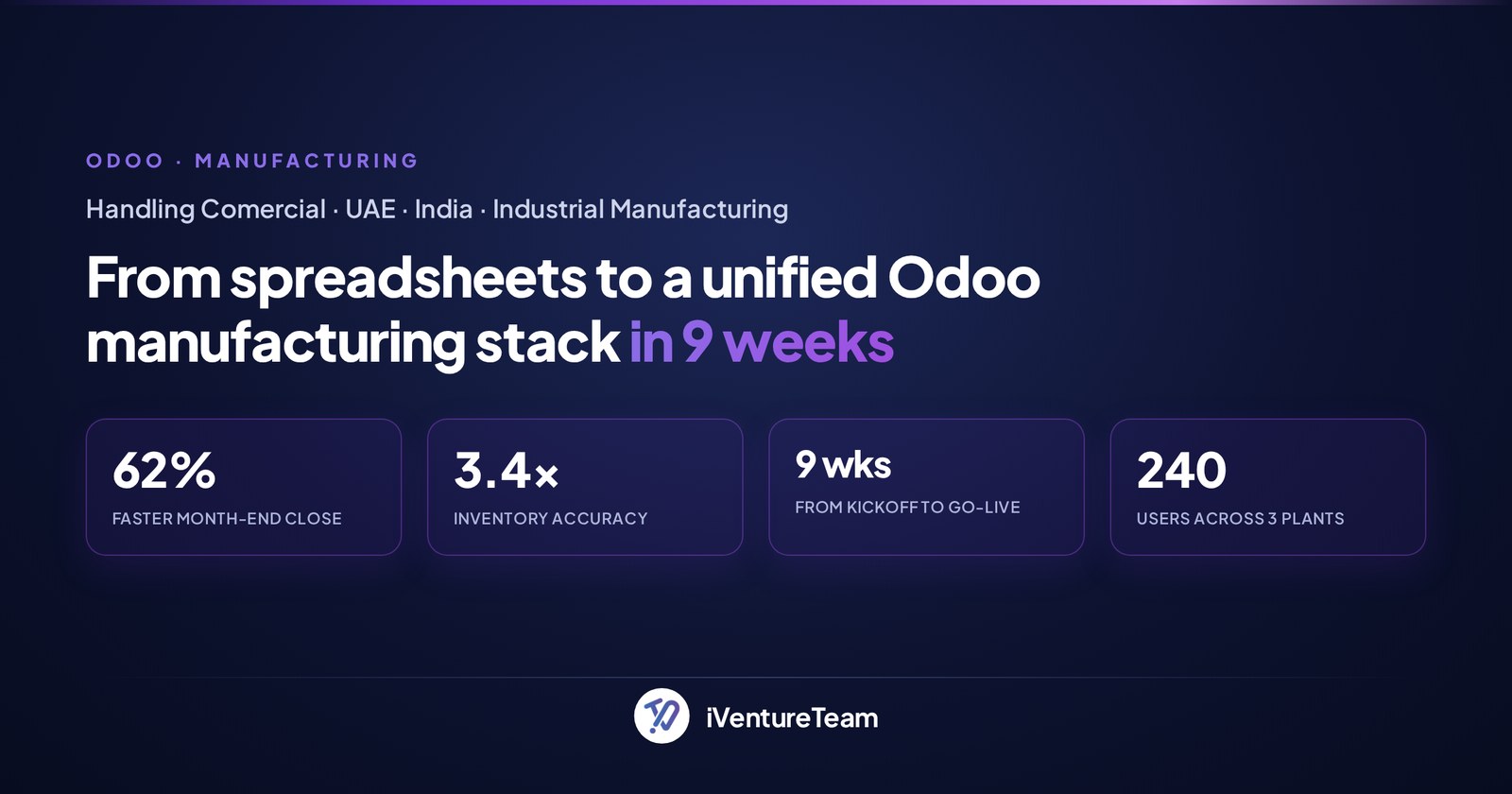
Handling Comercial, a UAE and India manufacturer with 240 users across 3 plants, had accounts in Tally and inventory in spreadsheets. iVentureTeam migrated six years of Tally journals into Odoo, fully reconciled, and connected accounting to manufacturing.
Within 30 days of go-live, month-end close dropped from 11 days to 4.2, stock accuracy rose from 62% to 99.7%, and the business saved around $240k a year from reduced inventory write-offs.
The same workflow holds across finance contexts, not only manufacturing.
For a Dutch tax advisory, we automated the practice on Odoo 18 accounting, cutting the manual, duplicate-prone entry. For a Belgian chemicals distributor, we built 8 SQL-powered management reports so margin and stock rotation are visible on demand.
The bottom line on how Odoo accounting works
Odoo accounting works because it is one connected workflow, where documents become posted entries, posting updates of the ledger live, and reports rebuild themselves from that ledger. The control gate is posting, and the truth check is reconciliation.
Understand those ten stages and you can judge whether Odoo fits your finance function, and where a clean setup will save you the most time. The software is capable; disciplined configuration is what makes it sing.
Ready to set up Odoo accounting the right way?
You do not have to configure the Odoo accounting workflow by trial and error. In one free 30-minute consultation, a senior Odoo consultant will review your accounting needs, recommend the right setup for your region, and outline a clear implementation plan.
Book your free Odoo consultation today. Prefer to speak with us directly? Call +91-90235-15208 or email business@iventureteam.com.
Frequently Asked Questions
What is Odoo accounting?
+
Odoo accounting is the finance module of Odoo ERP. It records double-entry journal entries from sales, purchase, and manual documents, posts them to the general ledger in real time, and generates financial statements such as the profit and loss and balance sheet live from those entries.
How does Odoo accounting work?
+
Odoo accounting works as a ten-stage workflow: setup, transactions, journal entry, validate and post, general ledger, receivables and payables and tax, payments, bank reconciliation, period close, and live reporting. Each document becomes a balanced entry that updates the ledger once posted.
Is Odoo accounting double-entry?
+
Yes. Odoo uses full double-entry accounting, so every journal entry has balanced debit and credit lines. Posting an entry updates the general ledger, and posted entries are immutable, corrected only through credit notes or reversal entries rather than deletion.
Is accounting free in Odoo Community or only Enterprise?
+
Odoo Community includes basic invoicing, while the full accounting features such as bank synchronization, reconciliation models, and financial reports require Odoo Enterprise. Most businesses that want the complete workflow described here use Odoo Enterprise.
How does bank reconciliation work in Odoo?
+
Odoo imports your bank statement by sync, CAMT, OFX, or CSV, then matches lines against outstanding invoices and payments. Reconciliation models automate recurring matches like bank fees and internal transfers, and an invoice is marked Paid only once its payment is reconciled.
Can Odoo generate financial statements automatically?
+
Yes. Odoo generates the profit and loss statement, balance sheet, cash flow statement, general ledger, tax report, and aged receivable and payable live from posted entries, with no manual rebuild. Reports are always current because the ledger updates in real time.
Does Odoo accounting handle UAE VAT and e-invoicing?
+
Yes. With the UAE localization configured, Odoo applies 5% VAT through fiscal positions, produces the tax report, and supports FTA e-invoicing readiness through an accredited service provider. Correct setup of taxes and fiscal positions is what makes compliance reliable.
Ready to put this into action?
Talk to iVentureTeam about Odoo, AI automation, or custom development — get a free, no-obligation consultation.
Free Odoo tools
All tools- Odoo Health CheckVersion, modules, findings and upgrade cost
- Odoo App SelectorWhich apps you need, by industry
- Odoo Project EstimateIndicative cost and timeline in minutes
- Odoo Implementation Cost CalculatorImplementation cost and timeline, in minutes
- Odoo Migration Cost CalculatorVersion jump or legacy ERP, priced in minutes
Continue reading

Odoo Rental Management in Odoo 20: Pricing, Deposits, Late Returns
Odoo rental management in Odoo 20: pricelist-based rental pricing with a worked example, deposits, late returns, pickup, online booking and when to customize.

Odoo for Food Manufacturing: Lot Tracing, Expiry, FEFO and Recalls
Odoo for food manufacturing: set up lot traceability, expiry dates, FEFO picking, quality checks and recalls in Odoo 20, plus apps, FSMA 204 and cost.

Legacy ERP Replacement with Odoo: Retirement Signs and 90-Day Plan
Legacy ERP replacement with Odoo: end-of-life dates for GP, NAV and SAP ECC, retirement signs, a data and cut-over plan, and a 90-day switch roadmap.