
Document Workflow Automation (2026 Complete Guide)
 Siddharth JambukiyaOdoo Techno-Functional Consultant




Your team is not slow. They are stuck retyping what a machine could read. Invoices get keyed into the accounting system by hand, onboarding forms get copied into the HR tool, order details get moved from email into the ERP.
It is quiet, repetitive work that burns hours and quietly introduces errors. The pressure to fix it is real: Gartner projects that 30% of enterprises will automate more than half of their network activities by 2026, up from less than 10% in 2023.
This guide shows what document workflow automation actually is, which processes to automate first, and how to roll it out without breaking what already works.
What is document workflow automation?
Document workflow automation is the use of software to move a document through its lifecycle, from capture to filing, with little or no manual data entry.
Instead of a person reading a PDF and typing its contents into another system, the software reads the document, applies rules to decide what happens next, and updates your business systems automatically.
It sits at the overlap of three capabilities: intelligent document processing to read and extract data, workflow automation to route and approve it, and integration to write the result into your ERP, CRM, or helpdesk. Remove any one of those and you are back to copy and paste.
The real cost of manual data entry
Manual data entry is expensive in three ways at once: the hours spent typing, the errors that slip through, and the delays while documents wait in someone's inbox.
The typing is the visible cost. The errors and delays are the ones that show up later as a wrong payment, a compliance gap, or a customer chasing an order.
It is also getting harder to justify. The Association for Intelligent Information Management reports that only 29% of organizations rate their process and workflow design skills as advanced, so most teams are absorbing this cost without a plan to remove it.
And when they do start automating, Camunda's State of Process Orchestration and Automation found 85% of organizations say process management gets more complex once automated and manual steps are mixed, with 56% blaming legacy systems. The lesson is not to avoid automation; it is to design it deliberately.
Here is where the hours usually go in a document-heavy team:
Manual step | What it really costs |
Re-keying invoices into the accounting system | Hours per week, plus payment errors and duplicate entries |
Copying onboarding forms into HR and payroll | Delays to a new hire's start, missing records at audit time |
Moving order details from email into the ERP | Slower fulfilment and mismatched stock or pricing |
Filing and tagging documents by hand | Lost files, slow retrieval, and time wasted searching |
Benefits of document workflow automation
Document workflow automation gives you back hours, cuts data-entry errors, speeds up approvals, and leaves a clean audit trail for compliance.
The gains compound, because the same data captured once then feeds every downstream step.
Saves hours of admin: staff stop re-keying and move to higher-value work.
Cuts data-entry errors: the document is read once and validated, not retyped.
Speeds up cycle times: routing and approvals happen in minutes, not days.
Strengthens compliance: every action is logged with a full audit trail.
Improves visibility: you can see where each document is and where it stalls.
Scales without new headcount: rising volumes are handled by the workflow, not more hires.
How document workflow automation works
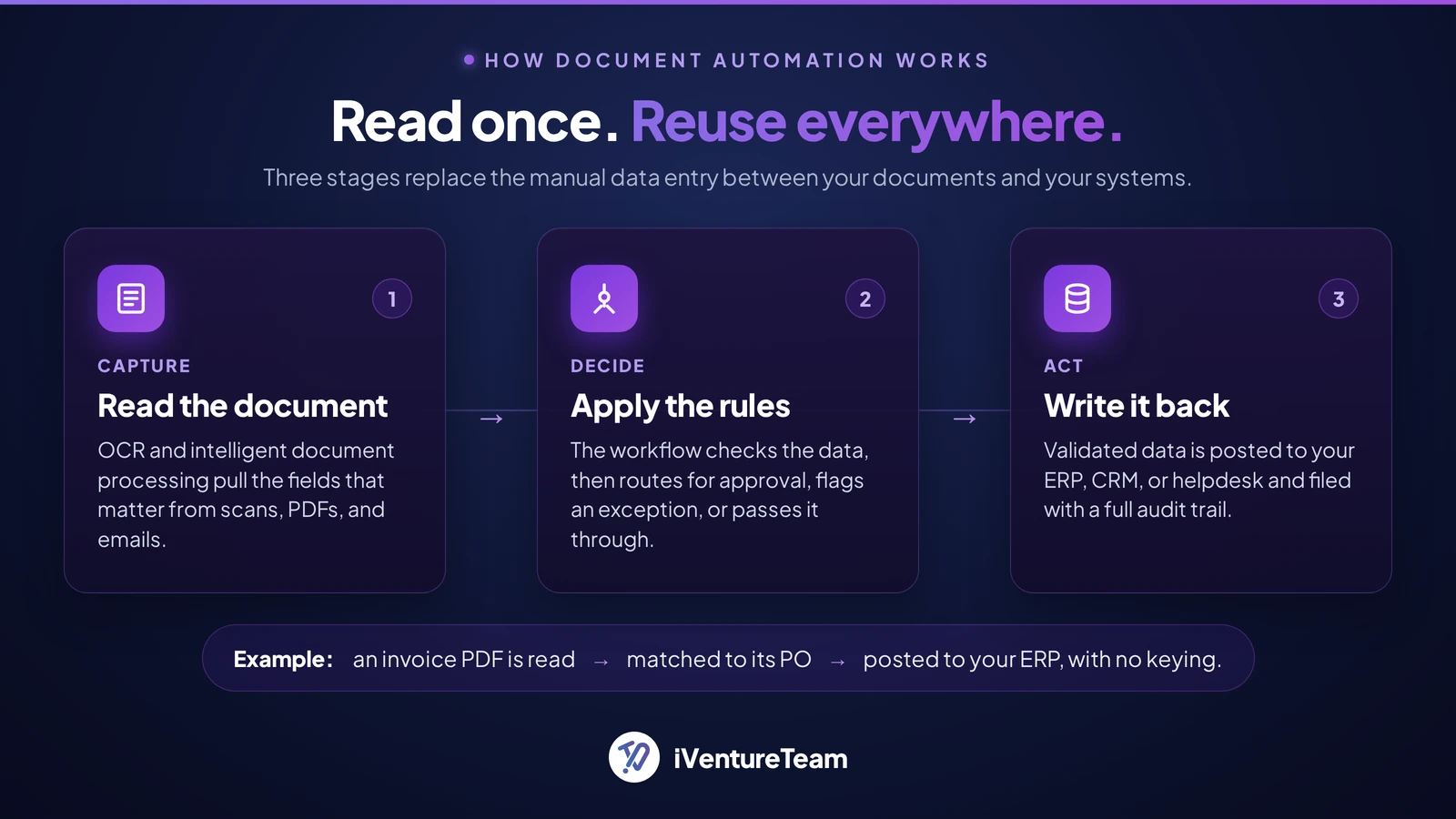
An automated document workflow runs in three stages: capture, decide, and act. Each stage replaces a manual step, and the data entry disappears because the document is read once and reused everywhere.
1. Capture (read the document): optical character recognition (OCR) and intelligent document processing (IDP) read a scan, PDF, or email attachment and pull out the fields that matter, such as invoice number, amount, vendor, or line items. Modern IDP uses AI to handle messy, non-standard layouts, not just fixed forms.
2. Decide (apply the rules): the workflow engine checks the extracted data against your rules. Is the amount within the approved limit? Does the vendor exist? Route for approval, flag an exception, or pass it straight through.
3. Act (write it back): the validated data is written into the system that owns it, and the document is filed with the right tags and an audit trail. This is the step that ends manual data entry, and it only works if the tool integrates with your ERP, CRM, and helpdesk.
What you can automate: high-value document workflows
The best candidates are document workflows that are high volume, rule-based, and error-prone today. These are the ones where automation pays back fastest.
Workflow | What automation does |
Invoice processing (accounts payable) | Reads the invoice, matches it to a purchase order, routes for approval, posts to the ledger |
Employee onboarding | Collects forms, extracts details, creates records in HR and payroll, tracks completion |
Contracts and e-signature | Generates from templates, routes for signature, files with an audit trail |
KYC and compliance documents | Extracts and validates identity data, flags gaps, keeps a retention record |
Order and quote processing | Pulls details from email or PDF into the ERP, updates stock and pricing |
Which process should you automate first?
Automate the process that scores highest on volume, error rate, and how rule-based it is, and lowest on exceptions.
Do not start with the hardest, most political workflow. Start with the one that is boring, frequent, and follows clear rules, because that is where automation is both easiest and most valuable.
Score each candidate process from 1 (low) to 3 (high) on the first three factors, then subtract the exception score. The highest total is your first project.
Factor | Score high when... |
Volume | The task happens many times a day or week |
Error rate | Manual entry regularly produces mistakes or rework |
Rule-based | The steps follow clear, repeatable logic |
Exceptions (subtract) | Many cases need human judgement or are one-off |
Invoice processing usually wins this scoring for finance teams: high volume, high error cost, clearly rule-based, and few true exceptions. That is why accounts payable is the most common first automation.

What to look for in document workflow automation software
Prioritize accurate data capture, real integrations, human-in-the-loop review, and a full audit trail. A tool that only stores files is a filing cabinet. A tool that reads, routes, and writes data is automation.
Intelligent capture (OCR and IDP): reads non-standard layouts and validates the data it extracts, not just fixed templates.
Real integrations: connect to your ERP, CRM, and helpdesk through APIs so data flows both ways, not just a widget bolted on top.
Human-in-the-loop review: routes low-confidence extractions and exceptions to a person instead of guessing.
Rules and routing: event-triggered actions, approval hierarchies, and notifications you can configure without code.
Audit trail and version control: a complete history of who changed what, which matters for compliance.
Security and access control: role-based permissions, encryption, and data classification for sensitive documents.
Scalability: handles rising volumes and file types without slowing down.
How to automate your document workflow: a 6-step rollout
Roll out in small steps: map the current process, pick one workflow, choose the tool, digitize inputs, set rules with human review, then train and measure. Automating a broken process just makes the mess faster, so fix the steps before you automate them.
1. Map the current workflow:
Write down every step a document takes today, including who touches it and where it waits.
2. Pick one high-scoring process:
Use the scoring above and start with a single, high-volume, rule-based workflow.
3. Choose the right tool:
Match features to your process and confirm it integrates with your existing systems, rather than adding another silo.
4. Digitize the inputs:
Use OCR and IDP to turn scans, PDFs, and emails into structured data the workflow can act on.
5. Set the rules and keep a human in the loop:
Automate the routine paths and route exceptions and low-confidence cases to a reviewer.
6. Train the team and measure:
Track processing time, error rate, and exception volume, then expand to the next process once the numbers hold.
Common mistakes to avoid
The usual failures are automating a broken process, removing human review too early, and skipping measurement.
Automating the mess: if the manual process is unclear, fix it first; automation locks in whatever logic you give it.
No human in the loop: full auto-processing of low-confidence extractions creates silent errors that surface later.
Ignoring exceptions: design the exception path from day one, because the edge cases are where trust is won or lost.
No baseline or metrics: without before-and-after numbers on time and errors, you cannot prove value or tune the workflow.
How iVentureTeam approaches document workflow automation
We build document workflow automation that ends manual data entry by writing clean data straight into the systems you already run.
Our work starts with the one or two document workflows that carry real volume, then layers AI document processing to read them and workflow automation to route and post the data.
Integration is the part we know best. Across 13+ years and 150+ delivered projects in 35+ countries, we connect document workflows to ERP, CRM, and helpdesk systems so the extracted data lands where your team actually works, often inside Odoo, where we build a wider set of AI use cases.
The guardrails and audit trail keep it safe. When a chatbot or agent sits on top of that data, our AI agents and RAG work fits the same stack, and the same criteria for choosing an AI partner apply.
Two Real-World Document Workflows We Automated
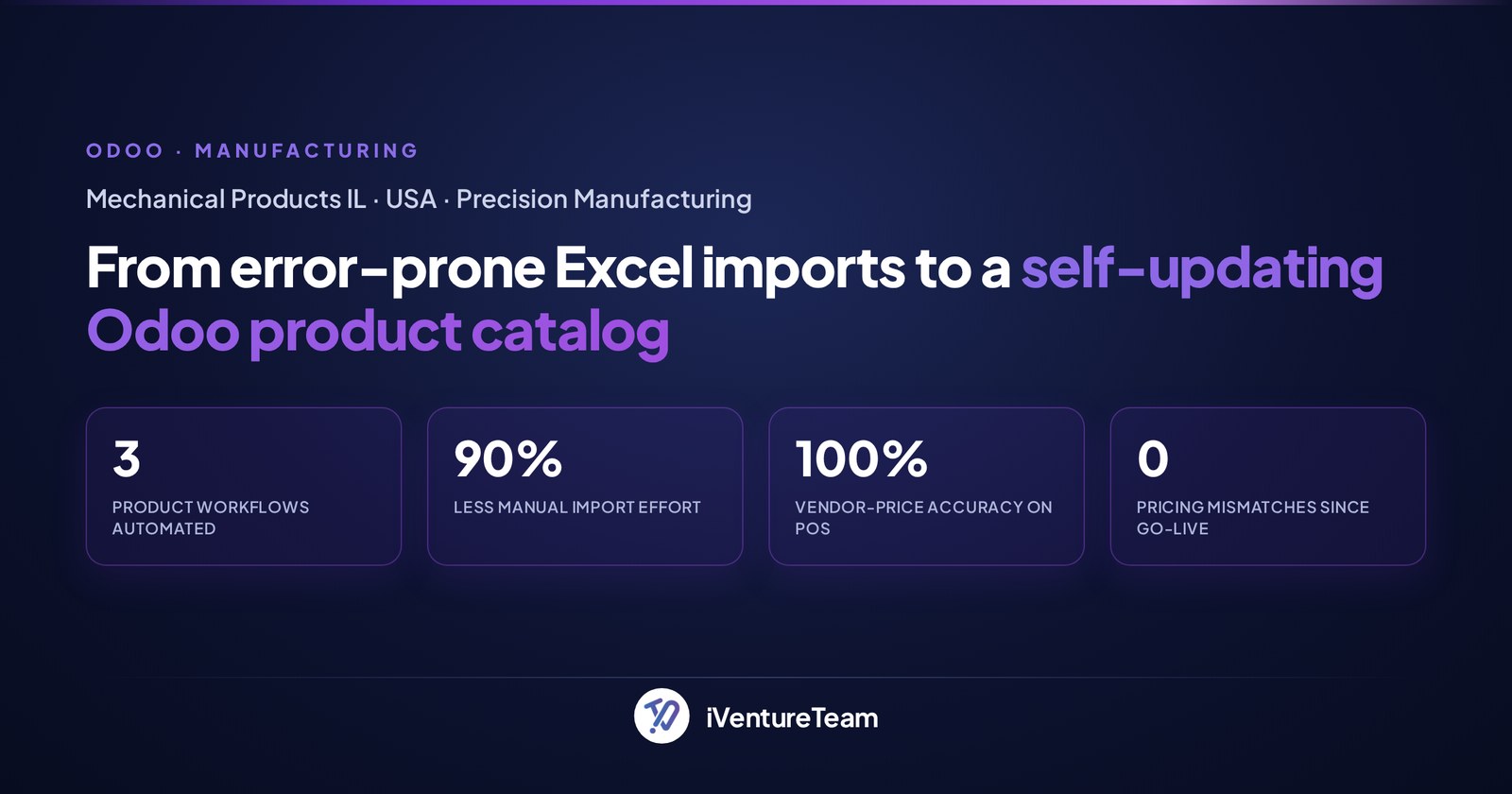
We built a custom product-lifecycle module that creates, updates, and archives products straight from the sheet, with scheduled price sync and fixes so every PO pulls the latest vendor price.
The result: about 90% less manual import effort, 100% vendor-price accuracy on purchase orders, and zero pricing mismatches since go-live, delivered in six weeks.
2. A Dutch tax advisory had outgrown a rigid legacy system and was hand-keying data across tools. That produced duplicate records staff had to reconcile and compliance reports with translation gaps, a real liability for output that feeds government filings.
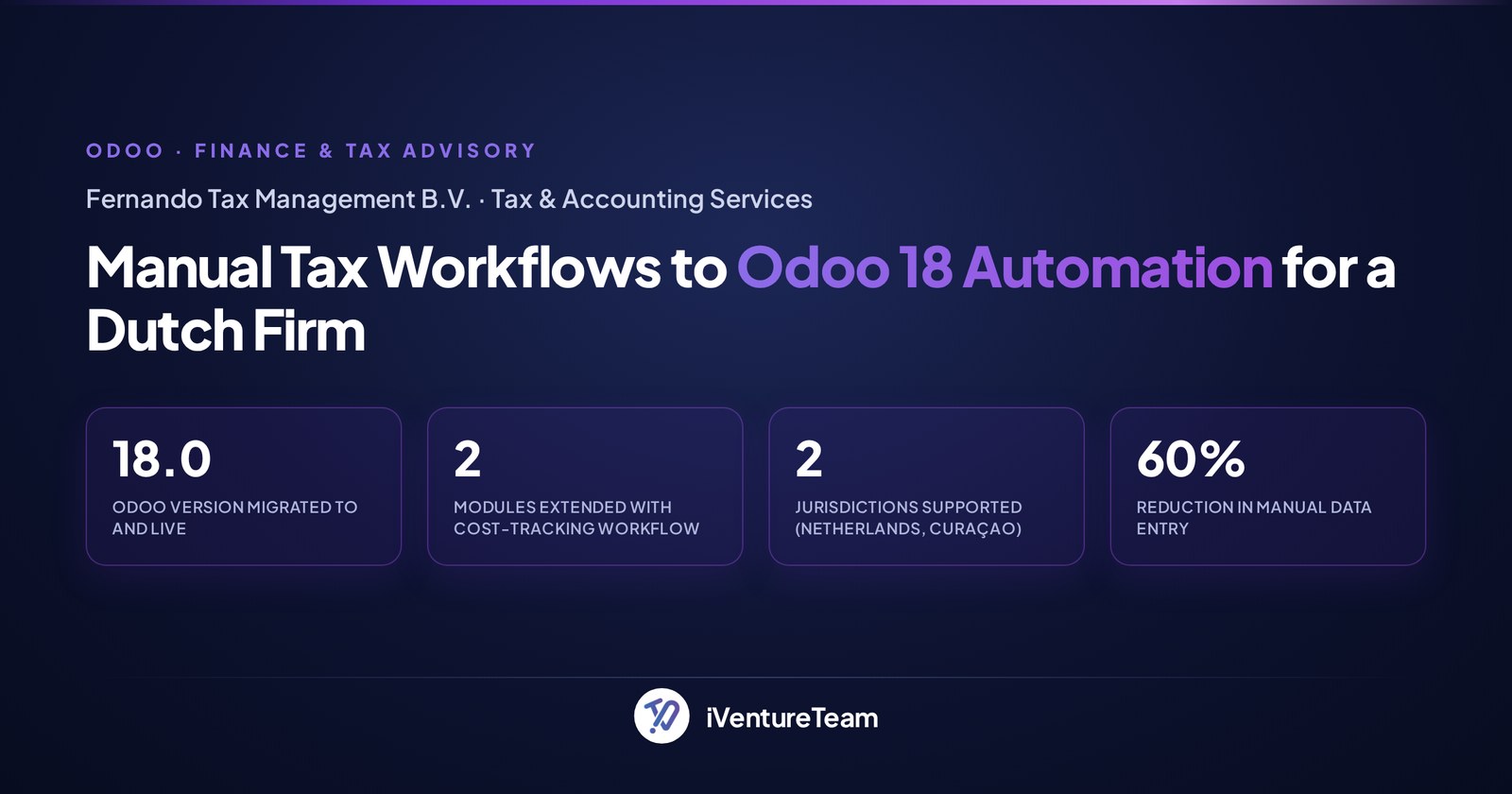
We migrated the firm to Odoo 18 and shaped it around a tax practice, with cost tracking built into Sales and Purchase and localized, compliance-ready reporting.
Manual data entry dropped by 60%, multi-language reports came out clean and compliant, and the team now works from one system of record instead of reconciled spreadsheets.
Conclusion
Document workflow automation is not about handling more paperwork; it is about deleting the retyping between your documents and your systems. Read the document once, apply the rules, and write the data where it belongs.
Start with one high-volume, rule-based, error-prone process, keep a human on the exceptions, and measure the time and errors you remove. Do that and the hours your team loses to manual data entry stop coming back.
Ready to stop retyping your documents?
You do not need a year-long program to start. In one free scoping call, we will map your most painful document workflow, show where the manual data entry disappears, and size a pilot you can prove in weeks.
Book a free document automation scoping call with our team.
Frequently Asked Questions about Document Workflow Automation
What is document workflow automation?
+
Document workflow automation is the use of software to capture, route, approve, and file documents automatically, so data no longer has to be typed by hand from one system into another. It combines intelligent document processing, workflow rules, and integrations with your business systems.
How does document workflow automation reduce manual data entry?
+
It reads the document once with OCR and intelligent document processing, validates the extracted data against your rules, and writes it directly into your ERP, CRM, or helpdesk. Because the data is captured and reused automatically, no one has to re-key it.
What is intelligent document processing (IDP)?
+
Intelligent document processing is AI-based capture that reads non-standard and unstructured documents, such as varied invoice layouts, and extracts structured data from them. It goes beyond basic OCR by understanding context and validating what it pulls out.
Which document processes should I automate first?
+
Start with a workflow that is high volume, error-prone, and rule-based, with few exceptions. For most finance teams that is invoice processing (accounts payable); for HR it is often onboarding. Score your candidates before you commit.
How much does document workflow automation cost?
+
It depends on volume, the number of integrations, and how much custom logic you need, so a scoped quote beats any single figure. Integrations and data preparation usually drive cost more than the software itself, and starting with one process keeps the first project small and provable.
Is automated document processing secure and compliant?
+
A good setup adds security rather than removing it: role-based access, encryption, data classification, and a complete audit trail of every action. That audit trail often makes compliance easier than manual handling, where changes go untracked.
Ready to put this into action?
Talk to iVentureTeam about Odoo, AI automation, or custom development — get a free, no-obligation consultation.
Free Odoo tools
All tools- Odoo Health CheckVersion, modules, findings and upgrade cost
- Odoo App SelectorWhich apps you need, by industry
- Odoo Project EstimateIndicative cost and timeline in minutes
- Odoo Implementation Cost CalculatorImplementation cost and timeline, in minutes
- Odoo Migration Cost CalculatorVersion jump or legacy ERP, priced in minutes
Continue reading

Odoo Upgrade Verification: Problems That Do Not Surface Until Month-End

Odoo 20 Field Service Change: Impact on Dispatch and Service Operations
